Mastodon

Running Rails 3 with no ActiveRecord

I am just finishing a simple app that doesn’t require a database. When running it on the server I was getting errors saying :

LoadError (no such file to load — sqlite3):

But it was already commented out of my Gemfile. It took some thinking before I realized that ActiveRecord is probably looking for that by default regardless of whether or not I am including it in my Gemfile. So the solution was to remove ActiveRecord. That used to be reasonably obvious in Rails 2.3 but Rails 3 made it a little less so. A standard config.application.rb file starts with the lines:

require File.expand_path(‘../boot’, __FILE__)

require ‘rails/all’

Rails 3 is broken up into a bunch of different parts and that require ‘rails/all’ pulls in, well all of them including ActiveRecord. An equivalent statement would be:

require “active_record/railtie”
require “action_controller/railtie”
require “action_mailer/railtie”
require “active_resource/railtie”
require “rails/test_unit/railtie”

Of course once you have exchanged ‘rails/all’ for that, you can simply comment out ActiveRecord and that’s that. If you are starting a new Rails app you can have Rails do that for you by using the flags -O or –skip-activerecord.

Now that AR is gone, my app starts without looking for a database and all is goodness and light.

Rails 3 on dreamhost

Since is seems strangely difficult to find a straight answer about getting Rails running on Dreamhost, here are the current versions of all the important programs:

_ \ _|_` | _` | | | -_)
.__/_|\__,_|\__, |\_,_|\___|
_| ____/
Welcome to prague.dreamhost.com

Any malicious and/or unauthorized activity is strictly forbidden.
All activity may be logged by DreamHost Web Hosting.

[prague]$ ruby -v
ruby 1.8.7 (2008-08-11 patchlevel 72) [x86_64-linux]
[prague]$ rails -v
Rails 3.0.3
[prague]$ gem -v
1.3.6
[prague]$ bundle -v
Bundler version 1.0.7
[prague]$ date
Sun Mar 20 19:04:34 PDT 2011

Keeping credentials out of your code with environmental vars

I have a project that is up on Github and deployed to Heroku. As I was adding the user credentials file to my project it dawned on me: my application needs these credentials when I run it on Heroku but I don’t want them to be part of my project and therefore visible to everyone on Github.

Turning to the great minds at Stackoverflow, I was advised to use environmental variables.
Since my application is connecting to another site via SFTP I have a hash of all the usual stuff; username password and hostname. It turns out you can just reference environmental variables like this:

@sftp_credentials = {Rails.env.to_sym => {
:sftp_host => ENV[‘SFTP_HOST’],
:sftp_user => ENV[‘SFTP_USER’],
:sftp_password => ENV[‘SFTP_PASSWORD’]
}}

And then make sure you have the environment vars set in your .bashrc so they are available during local development:

export SFTP_HOST=’somesite.com’
export SFTP_USER=’someuser’
export SFTP_PASSWORD=’somepassword’

And then set those variables on Heroku so they are available when your app runs there:

mike@sleepycat:~/projects/myapp$ heroku config:add SFTP_HOST=somesite.com SFTP_USER=someuser SFTP_PASSWORD=somepassword
Adding config vars:
SFTP_HOST => somesite.com
SFTP_PASSWORD => somepassword
SFTP_USER => someuser
Restarting app…done.

Scripting MySQL database setup for Rails with Bash

I am working a bash script to set up a complicated application. As part of that setup I need to run a series of SQL commands to create the initial users and databases this app will require.

It turns out you can get mysql to execute arbitrary statements from the command line using the -e switch but that would be both ugly and tedious for a lot of statements. Sounds like a job for heredocs! Lets try it out:

mike@railsdev:~$ read -d ” test <<‘EOT’
create database test;
select 1;
EOT

mike@railsdev:~$ mysql -u root -ppassword -e “$test”
+—+
| 1 |
+—+
| 1 |
+—+

Perfect! I love it when things work the way you expect. On to useful stuff:

read -d ” MYSQL_SETUP <<'EOF'
create database myapp_test;
create database myapp_development;
create database myapp_production;
CREATE USER 'appuser'@'localhost' IDENTIFIED BY 'myapp_password';
grant all privileges on myapp_production.* to appuser@localhost;
grant all privileges on myapp_test.* to appuser@localhost;
grant all privileges on myapp_development.* to appuser@localhost;
EOF

mysql -u root -ppassword -e "$MYSQL_SETUP"

And then use the same trick to write a nice new database.yml for the app to use those credentials:

read -d ” DB_CREDENTIALS <<'EOF'
production:
adapter: mysql
database: myapp_production
pool: 5
username: appuser
password: myapp_password

development:
adapter: mysql
database: myapp_development
pool: 5
username: appuser
password: myapp_password

test:
adapter: mysql
database: myapp_test
pool: 5
username: appuser
password: myapp_password
EOF

read -d '' DB_CREDENTIALS < /var/www/myapp/config/database.yml

Creating Rails users in Postgres on Ubuntu

Note: Since writing this I have revisited this issue and found a better way. read about it here.

I am getting started with a new greenfield Rails app and had a bit of an adventure setting up a user for my Rails app in Postgres. My attempts to connect or create a database would fail. I thought I had created a user properly but apparently I was wrong.
Now I know for next time.
Start with the create user command:


mike@sleepycat:~$ sudo -u postgres createuser --createdb --pwprompt desired_username

You can see we are using the createdb option in this call, allowing the user we are creating to create new databases. You can take a look at the databases available and the users that can access them with the command:


sudo -u postgres psql -l

So now lets assign the user we created rights on the database we just created with:


mike@sleepycat:~$ sudo -u postgres psql my_project_development -c "grant all privileges on database my_project_development to desired_username;"
GRANT

I had hoped that might be all that was needed but then my rake task crapped out:


mike@sleepycat:~$ rake db:create

Couldn't create database for {"encoding"=>"unicode", "username"=>"desired_username", "adapter"=>"postgresql", "database"=>"my_project_test", "pool"=>5, "password"=>nil}
FATAL:  Ident authentication failed for user "desired_username"

It turns out that Postgres is set to expect the user accessing the database to actually have a system account. That seems like a little much for a development environment where I would end up with tonnes of those accounts. To change that expectation you need to edit the host-based authentication configuration file pg_hba.conf:


sudo vim /etc/postgresql/8.4/main/pg_hba.conf

Press capital G to jump to the bottom of the file and change “local all postgres ident” and “local all all ident” to md5 as shown below:


# DO NOT DISABLE!
# If you change this first entry you will need to make sure that the
# database super user can access the database using some other method.
# Noninteractive access to all databases is required during automatic maintenance
#(custom daily cronjobs, replication, and similar tasks).
# Database administrative login by UNIX sockets
local   all         postgres         md5

# TYPE  DATABASE    USER        CIDR-ADDRESS      METHOD
# "local" is for Unix domain socket connections only

local   all         all         md5
# IPv4 local connections:
host    all         all         127.0.0.1/32    md5
# IPv6 local connections:
host    all         all         ::1/128       md5

Restart your Postgres server and you should be good to go.


mike@sleepycat:~/projects/key_master$ sudo /etc/init.d/postgresql-8.4 restart
* Restarting PostgreSQL 8.4 database server
...done.

Now your Rails users don’t need to have system accounts and your rake tasks should run just fine. Back to work!

Thanks to Mark Berry for his comments below! They have been incorporated into the post now.

no such file to load — json?

While upgrading a project of mine to Rails 3 I stumbled upon a json error. I don’t know what exactly caused it since I have been upgrading from Ubuntu Karmic to Lucid in the past few days. Since this took a little head scratching I thought I would write it down here so I don’t forget. Hopefully it will save someone else some fooling around as well.
The error is coming from the jsvars plugin which is trying to call require ‘json’.

mike@sleepycat:~/projects/todasaulas$ rails s
=> Booting WEBrick
=> Rails 3.0.0 application starting in development on http://0.0.0.0:3000
=> Call with -d to detach
=> Ctrl-C to shutdown server
Exiting
/usr/lib/ruby/gems/1.8/gems/activesupport-3.0.0/lib/active_support/dependencies.rb:239:in `require’: no such file to load — json (LoadError)
from /usr/lib/ruby/gems/1.8/gems/activesupport-3.0.0/lib/active_support/dependencies.rb:239:in `require’
from /usr/lib/ruby/gems/1.8/gems/activesupport-3.0.0/lib/active_support/dependencies.rb:225:in `load_dependency’
from /usr/lib/ruby/gems/1.8/gems/activesupport-3.0.0/lib/active_support/dependencies.rb:591:in `new_constants_in’
from /usr/lib/ruby/gems/1.8/gems/activesupport-3.0.0/lib/active_support/dependencies.rb:225:in `load_dependency’
from /usr/lib/ruby/gems/1.8/gems/activesupport-3.0.0/lib/active_support/dependencies.rb:239:in `require’
from /home/mike/projects/todasaulas/vendor/plugins/jsvars/lib/jsvars.rb:1

It turns out that json is provided by libjson-ruby on Ubuntu so the fix was as easy as

mike@sleepycat:~$ sudo aptitude install libjson-ruby

I’m not sure why things were working before if that wasn’t there. Who knows all the stuff that gets changed in an upgrade. You learn something new everyday.

Rendering templates in Rails Metal

One of the things that has caught my interest lately is Rack. After reading about it a bunch I was looking for a way to start integrating it into my projects somehow. Adam Wiggins of Heroku, had an interesting presentation that called Rails Metal the “a gateway to the world of Rack.” Its a good description, and one that gave me a starting place for using Rack in my project.

If you run the “script/generate metal nameofMetalApp” command, Rails will generate the code for a small Rack app and dump it in the app directory of your project in a folder called “metal”. Inside that app, there are no Rails helpers, no convenience methods, no redirects or renders. You really are in a new world.

The reason for that is that Rails won’t have been loaded when the a request hits this little app. Its only if the apps in the metal folder all return 404 that Rails gets loaded at all.
What is gained here is speed. If a couple lines of code is sufficient to handle the request, why load an entire framework? For simple actions that happen a lot, it can make a big difference. The first thing I wanted to know was how to render HAML or ERB pages in my Metal apps.

Since that is probably pretty common I thought I would post it up here. Its not complicated but it will save some searching. I decided I would create a Metal end point that would serve up a static “about” page. There are many useful things to do with Metal, and while an “about” page might not be one of them, its a good place to start:

# Allow the metal piece to run in isolation
require(File.dirname(__FILE__) + &quot;/../../config/environment&quot;) unless defined?(Rails)
#added HAML
require 'haml'
class AboutApp
  def self.call(env)
    if env[&quot;PATH_INFO&quot;] =~ /^\/about/
      @time = Time.now
      #Render a HAML template using the HAML engine
      #http://haml-lang.com/docs/yardoc/Haml/Engine.html
      template = File.read(File.join(&quot;app&quot;,&quot;views&quot;, &quot;static&quot;, &quot;about.html.haml&quot;))
      haml_engine = Haml::Engine.new(template)
      output = haml_engine.render(binding)
      #Alternately you can render an ERB template
      #http://ruby-doc.org/stdlib/libdoc/erb/rdoc/classes/ERB.html
      #template = File.read(File.join(&quot;app&quot;, &quot;views&quot;, &quot;static&quot;, &quot;about.html.erb&quot;))
      #output = ERB.new(template).result(binding)
      [200, {&quot;Content-Type&quot; =&gt; &quot;text/html&quot;}, [&quot;#{output}&quot;]]
    else
      [404, {&quot;Content-Type&quot; =&gt; &quot;text/html&quot;}, [&quot;Not Found&quot;]]
    end
  end
end

Notice that I am creating an instance variable @time which is available in the templates because I am passing in binding objects to the renderer for both HAML and ERB.
And a basic template so we can see that its working (excuse the lack of spacing, wordpress is messing it up):

!!!
%html
  %body
    %h1 The time is
    %p
      =@time

Then fire up your server and request “/about”. That’s it. The thing to remember is that these Metal apps are real Rack apps. While most of them will be pretty basic, they don’t have to be. They just have to conform to the Rack spec. I have been curious about Sinatra for a while now and this seemed like a good time to try it out and see if I could use it instead of Metal. I wrote a quick little Sinatra app and dropped it into the metal folder, requested “/test” and there it was. (Again, excuse the lack of spacing)

require 'rubygems'
require 'sinatra'
require 'haml'
class TestApp &lt; Sinatra::Application
  get '/test' do
    output =&lt;&lt;-EOHAML
    !!!
    %html
      %body
        %h1
          Hello from Sinatra!
    EOHAML
    haml output
  end
end

While the purpose of all this is performance, it also seems that this is a fairly nice way to add other apps to your existing one. Say, if I wanted to run a basic CMS alongside one of my Rails apps for marketing purposes. What’s extra cool is that using a Rack based authentication middleware like Warden would mean that both apps would share an authentication mechanism. There are a lot of possibilities to explore!


Rails has_and_belongs_to_many

I had a pretty zealous database design teacher pounded into us at school that if many to many relationships are coming up a lot in your design, then its probably a bad design. That still seems like solid advice to me but there are definitely times when its totally legit to use them. Tags, categories, roles. That sort of thing. Its been a while since I did one and I stumbled through doing one just now. Because of that I thought I would write it up for next time I need to have my memory jogged but also because I remember struggling with relations when I started doing Rails. So here goes.

I have an “Account” model and a “Role” model and want an account to have a habtm relation with roles. I started with this in my migration (which turned out to be wrong):

create_table :accounts_roles do |t|
t.integer :account_id
t.integer :role_id
end

Which produces this in the database:

mysql> desc accounts_roles;
+————+———+——+—–+———+—————-+
| Field      | Type    | Null | Key | Default | Extra          |
+————+———+——+—–+———+—————-+
| id         | int(11) | NO   | PRI | NULL    | auto_increment |
| account_id | int(11) | YES  |     | NULL    |                |
| role_id    | int(11) | YES  |     | NULL    |                |
+————+———+——+—–+———+—————-+
3 rows in set (0.00 sec)

But the moment you try to save any associate a role with an account I got this:
ActiveRecord::ConfigurationError: Primary key is not allowed in a has_and_belongs_to_many join table (accounts_roles).
Which is actually one of the more helpful error messages I have seen, so thank you to whomever created it. A quick “rake db:rollback” and modify that migration:

create_table :accounts_roles, :id => false do |t|
t.integer :account_id
t.integer :role_id
end

“rake db:migrate” again and there we go. Now this is looking better:

mysql> desc accounts_roles;
+————+———+——+—–+———+——-+
| Field      | Type    | Null | Key | Default | Extra |
+————+———+——+—–+———+——-+
| account_id | int(11) | YES  |     | NULL    |       |
| role_id    | int(11) | YES  |     | NULL    |       |
+————+———+——+—–+———+——-+
2 rows in set (0.00 sec)

And don’t forget to add the relation to your models:

class Role < ActiveRecord::Base
has_and_belongs_to_many :accounts
end

class Account < ActiveRecord::Base
has_and_belongs_to_many :roles
end

Then you can save stuff in there using something like this:

>> me.roles.create :name => ‘admin’
=> #<Role id: 1, name: “admin”, created_at: “2010-07-02 20:31:01”, updated_at: “2010-07-02 20:31:01”>

Note that create implicitly saves the record so it already has a role id. The << operator works the same way so this would be equivalent:

me.roles<<Role.new(:name => ‘commenter’)

Build will add a new role object in there but won’t save it automatically so there won’t be a role id assigned until it is saved.

>> me.roles.build
=> #<Role id: nil, name: nil, created_at: nil, updated_at: nil>

That’s it!

Image overlays with Rmagick and Rails

I knew it wouldn’t be long before I had another foray into Rmagick. This time is pretty similar to last time, except this time I needed to overlay one image on top of another image. There are a few people who have posted about how to do this but I found the information pretty sparse. As I was looking I noticed that some people were using the ImageList class and others the Image class. After ping-ponging between the various tutorials and finding the differences between them pretty confusing, I thought I would sort myself out by using both.

So here is the code that generated that stunning image overlay. I tend to figure this stuff out by sticking it in a controller and tinkering  with it. Once it works I will move it into a model. The code below is taken from my controller. First, the version using the Rmagick’s ImageList class:

def rubylist
ruby = ImageList.new(‘public/images/ruby.jpg’)
rails = ImageList.new(‘public/images/rails.png’)
ruby.gravity=EastGravity
ruby.geometry=’0x0+20+20′
rails_on_ruby = ruby.composite_layers(rails, Magick::OverCompositeOp)
rails_on_ruby.format = ‘jpeg’
send_data rails_on_ruby.to_blob, :stream => ‘false’, :filename => ‘test.jpg’, :type => ‘image/jpeg’, :disposition => ‘inline’
end

So what we have are two ImageList objects; ruby and rails. I am going to use ruby as my “destination” ImageList, meaning it will be the base image that  the other image is applied to. Setting the Gravity and Geometry attributes on the “destination” object means that Rmagick will position the “source” image according to those settings. Calling composite_layers on ruby and feeding it rails and a composite operator let Rmagick know what should be combine with the base image and how it should combine them. Since we already gave it the “where” part of the equation with the gravity and geometry, the rest is easy.

Doing the same thing with the Image class instead of ImageList is just different enough to trip you (read: Me) up:

def ruby
ruby = Image.read(‘public/images/ruby.jpg’)[0] #This returns an Array! Get the first element.
rails = Image.read(‘public/images/rails.png’)[0]
rails_on_ruby = ruby.composite(rails, Magick::EastGravity, 0, 0, Magick::OverCompositeOp) #the 0,0 is the x,y
rails_on_ruby.format = ‘jpeg’
send_data rails_on_ruby.to_blob, :stream => ‘false’, :filename => ‘test.jpg’, :type => ‘image/jpeg’, :disposition => ‘inline’
end

Rmagick pretty consistently works in a way that is the opposite of what I expect. Where I would expect Image.read to return, say, an image, instead it returns an Array. So after some head scratching and a little RTFM time I learned you could do what you see above. Alternately you could do “Image.read(‘public/images/rails.png’).first” if you think it’s prettier. The geometry stuff takes a little fooling around to get sorted out and to see how it works with the gravity. My understanding is that the x,y is just to offset the object from where the gravity setting alone would have placed it.

Like the image annotations before, its not difficult to do, but its a pain to figure out. While there are a bunch of other ways to write this code, this will at least give a running start.

Adding text to pictures with Rmagick and Rails.

Recently I needed to add some dynamically generated text to an image with Ruby on Rails. For some reason there do not seem to be many tutorials on how to work with RMagick so I thought I would share what little I now about it. Originally I looked at Image Science but it turns out that its very focused on simply resizing images. So for this I turned to RMagick. I was a little worried that the installation would be nightmarish but it turned out to be quite painless (at least on Ubuntu. I can’t imagine what it would be like on Windows. Probably bad.):

mike@sleepycat:~$ sudo aptitude install imagemagick librmagick-ruby libmagickwand-dev

Then install the gem:

mike@sleepycat:~$ sudo gem install rmagick

RMagick is a complex library that has tonnes of graphics functions and can transform images in many different ways.
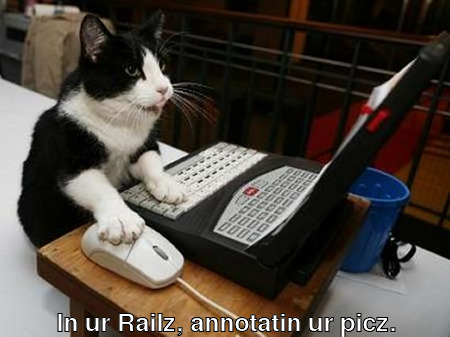
It seems that RMagick works conceptually the same for both Vector graphics and bitmap images: create an image and add text objects to it or create a canvas and add vector objects to it (using Ruby Vector Graphics aka:RVG). So lets do that. So here is an image to start with:

To start playing with RMagick, you can stick this in one of your controllers:

require ‘RMagick’
include Magick

def lolcat

img = ImageList.new(‘public/computer-cat.jpg’)
txt = Draw.new

img.annotate(txt, 0,0,0,0, “In ur Railz, annotatin ur picz.”){
txt.gravity = Magick::SouthGravity
txt.pointsize = 25
txt.stroke = ‘#000000’
txt.fill = ‘#ffffff’
txt.font_weight = Magick::BoldWeight
}

img.format = ‘jpeg’
send_data img.to_blob, :stream => ‘false’, :filename => ‘test.jpg’, :type => ‘image/jpeg’, :disposition => ‘inline’

end

And here is the output of that script:

Although sticking that in a controller is a quick way to see the results of some tinkering and experimentation, this is the kind of stuff that should really be in a model. You would likely want to return img.to_blob from one of your model methods and then use send_data from there.

It’s pretty basic but it was all I needed to get my project working. RMagick does seem to be a little arcane. A lot of the things I tried along the way failed in pretty confusing ways and with pretty cryptic errors. While simple stuff like this is fine its going to take a lot more reading and fiddling to make me truly comfortable with RMagick. At least I have this written down for next time…