Mastodon

Ubuntu hearts the Canon A70

One of the things that is often lost in all the well deserved hatred of Microsoft, is that they have spent millions of dollars on studying users and has produced something that, even with all its foibles, is pretty damn easy for most people to use.

As the spoiled beneficiary of all that study and development time I, and every other Windows user, have some pretty high expectations when it comes to having our computers just sort themselves out and do the right thing.

It seems that Mark Shuttleworth and the Ubuntu crew have been paying close attention to the rather expensive lessons that Microsoft has had to learn. I switched to Ubuntu in December and by and large it has lived up to its promise of being easy to use. Case in point; I borrowed a Canon A70 camera so Kathrine and I could take some pictures this weekend. I plugged it in and was greeted with this:
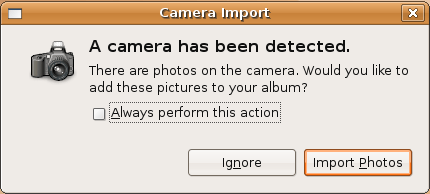
Ubuntu picture import

The Import Photos dialogue does exactly what you think it is going to do, and I actually find it faster and  less complicated than the Photo import wizard found in Windows.
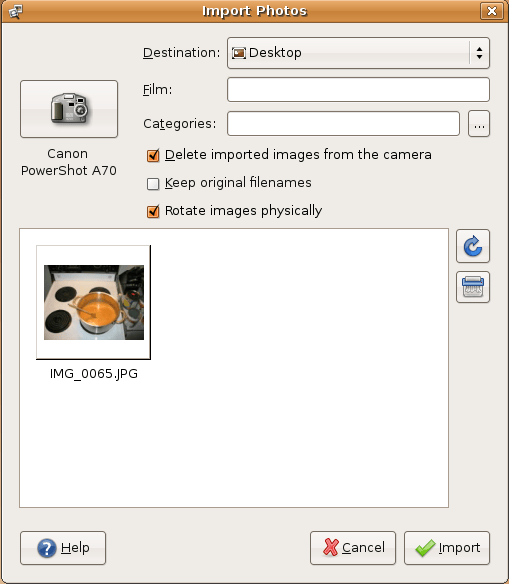
Importing pictures from the Canon A70

Ubuntu’s (and Linux in general’s) weak spot is that most companies only create drivers for Windows and leave Linux and Apple users to fend for themselves. This can make it a little dicey when you try connecting exotic things to your Linux system. In this case, it correctly identified the camera, dumped the images onto my desktop and cleaned off the memory card. In other words, everything I was expecting, and nothing I wasn’t. Nice!

Binary MADNESS Part II

My professor for this course was pretty hardcore. Being an old school Bulgarian mathematician he was all about making us understand how computers work with numbers, and doing it with a paper and pencil. Since there is surprisingly little about doing this that can be found on the internets, and it is kind of neat, here is how to do it.

Manually converting to binary:

13/2 = 6 remainder = 1
6/2 = 3 remainder = 0
3/2 = 1 remainder = 1
1/2 = 0 remainder = 1

The result of the conversion is reading the remainders from bottom to top: 1101 = 13

Manually converting fractional numbers to binary:

This is a little different. You multiply by two and if it makes 1 you remove the one and continue without it. The results of the conversion are all the ones and zeros that you have been putting off to the side this time read from top to bottom. It does get a little weird as you will see, because converting things like 0.5 or 0.625 hit 0 and ends very quickly:

0.5 X 2 = 1.0 | 1
0.0 X 2 = 0.0 | 0

0.5 is 0.10 in binary

0.625 X 2 = 1.25 | 1
0.25 X 2 = 0.5 | 0
0.5 X 2 = 1.0 | 1
0.0 X 2 = 0.0 | 0

0.625 = 0.101 in binary

Converting something like 0.8 will never hit 0 and must be stopped at some arbitrary point so the computer does not get stuck in an infinite loop:

0.8 X 2 = 1.6 | 1
0.6 X 2 = 1.2 | 1
0.2 X 2 = 0.4 | 0
0.4 X 2 = 0.8 | 0
0.8 X 2 = 1.6 | 1
0.6 X 2 = 1.2 | 1
0.2 X 2 = 0.4 | 0
0.4 X 2 = 0.8 | 0
0.8 X 2 = 1.6 | 1
0.6 X 2 = 1.2 | 1
0.2 X 2 = 0.4 | 0
0.4 X 2 = 0.8 | 0
…

That kind truncating of values gives mathematicians Tourette’s, because it effectively means that computers are incapable of generating a (mathematically) correct answer to any question. But if you know what you are doing you can generate an answer that is correct enough for whatever you are doing.

Binary MADNESS Part I

Ok so this is more so I don’t forget it, than because I think anyone will read it or care. But on the off chance you care about this kind of thing, here is what I learned about binary:

The position of the number indicates a multipul of the base of the number system (2) the same as what we have in the human base 10 number system.
So a 1 in the ones column gives us 1: 0001
And a one in the twos column would give us two: 0010
A one in both the ones and twos column gives us three: 0011
And the columns double in value as they move left. So 0100 is four, and 1000 is eight and adding a fifth column will give us sixteen and so on.

Adding:

Adding binary numbers is pretty simple.
0+0=0
0+1=1
1+1 = 0 and carry 1 to the next column.
1+1+ a carry of one = 1 and a carry of one.

So:

0111 (aka 7)
+0111
——–
1110 (aka 14)

Subtraction:

Ok this is a little weird. Computers don’t subtract. Well they do, but they do it by adding a negative to a positive. To create the negative number, called a twos compliment, you need to flip all the bits (change all the ones to zeros and vice versa) and then add one. It sounds simple but I screw it up pretty consistently, so I was very happy to find an idiot resistant method of finding a twos compliment just in time for my final exam:

Working from right to left, ignore any zeros and find the first one. Keep it the way it is flip all the other bits like so:

0111 (aka 7)
1001 (the twos compliment of 7)

so:

1110 (aka 14)
+1001 (plus the twos compliment of 7)
——-
0111 (equals 7!)

Technically it equals 10111 but computers can only work with so many bits at a time (the newest can now do 64 bits at a time, older ones just 32). In this case we are working with 4 bit numbers so any carrys from the addition will just be dropped. So the 1 on the far left will be chopped off leaving us with the 0111.

Meetings make us dumber, study shows

“People have a harder time coming up with alternative solutions to a problem when they are part of a group, new research suggests.

Scientists exposed study participants to one brand of soft drink then asked them to think of alternative brands. Alone, they came up with significantly more products than when they were grouped with two others.”

Read the full story…


What they need to study now is whether or not there is a cumulative effect. I have a hypothesis…


Bettershopper extension for Firefox 2.0

So I finally got tired of waiting for the developer of one of my favorite Firefox extensions to update it to work with Firefox 2. Clearly he has a life or some outside interests (like family or something) that is messing with his release cycle. Though I have tried to be patient, being the CD shopping junkie that I am, life without the comparison shopping abilities of bettershopper has been painful. Lately I have been doing some reading about extension development in Firefox and today, gripped by a random fit of productivity I grabbed the bettershopper extension and modified it myself so it works with Firefox 2.0. If I had known how small the change was, I would have done it sooner. If you want to install it in your browser (and you do), click here.

For those of you who have no idea what I am talking about, Bettershopper adds a table like this to product pages on Amazon showing you where you can get the best price on what you are searching for.

Bettershopper in action!

iPod battery problems

Well as you may have noticed from my previous posts, the battery life on the 5th generation iPod videos is not very good. Although it says 14 hours on the box, I was only able to get 5 and change and less than that if I were doing stuff that required backlight (reading for example). Although it would not suprise me if Rockbox used a little more battery than the Apple firmware, having it cause a drop that dramatic is a little hard to believe. My solution: Return the iPod, get a new one.

It seems that Apple has quietly upgraded the battery in the new generation of iPod videos; aka the iPod video 5.5 generation which is what I picked up today. Unfortunatly, though the refund was no problem, I find my self stymied by a new problem: Rockbox won’t work on the 5.5 gen iPod video.

Apparently Apple made the blocks of data on the hard drive four times larger (2048 byte sectors up from 512) than on the older 5 G, totally confusing the Rockbox installer. The programmers on the rockbox project are working on fixing it, but for now I am scratching my head over what to do with if I can’t play my music on it.

Sigh.

First entry in the “Not news” category…

The Daily Show is as substantive as the “real” news

The Daily Show is much funnier than traditional newscasts, but a new study from Indiana University says it has the same amount of meat on its bones when it comes to coverage of the news. The brand of news coverage Jon Stewart and the rest of The Daily Show’s staff brings to the airwaves is just as substantive as traditional news programs like World News Tonight and the CBS Evening News, according to the study conducted by IU assistant professor of telecommunications Julia R. Fox and a couple of graduate students. Read more…

iPod fragmentation; a cautionary tale.

On the way out the door from work today, I put in my earphones and fired up my iPod so I could rock out on the train home. To my frustration, the opening riff of my chosen song stopped abruptly and after nearly a full second, picked up where it left off only to be interrupted again every few seconds for the rest of the song. This behaviour itself was not new, it had happened a few times before, and was confined to a few songs and a much lower frequency. The afflicted songs were promptly re-ripped which seemed to solve the problem, but not today. As I skipped to the next song, it too choked and cut out, as did the next one, and the next one….

Exasperated, I stuffed my iPod back in my bag and resolved to resolve this at home. Staring out the train window I had a feeling that it might be worth defragging the poor thing. Over the last two weeks it had become a beast of burden, carrying gigs of digital goodies from my bittorrent download folder at home to my DVD burner at work. Low and behold:

Volume fragmentation
Total fragmentation = 6 %
File fragmentation = 13 %
Free space fragmentation = 0 %

Fragmentation is bad for iPods.

After a long slow defragmentation it now plays without a hiccup. Yay!

But I don’t feel retro…

Lately I have had a hankering to play some of the classic video games I remember from my childhood. I have many fond memories of playing metal gear with Aaron and my Dad, and of working my way through Super Mario 3 and Zelda during cookie fueled sleep overs with my friend John King. Funny how these things stick with you. Well I am happy to report that you too can satisfy the urge to revisit your childhood thanks to the thriving retro gaming community on the web. All you need is an emulator like Nestopia and a few ROMS.

Ninja Gaiden 2

Some of my favorites are Super Mario 2 and 3, Ninja Gaiden 2, Zelda and, strangely, Duck tales. You can find just about anything else you might want on Rom nation.
I am struggling to remember some of my other favorites. There was one with a special tank thing that you had to jump around like a character and a few others that are on the tip of my brain.

As a bonus you can also get the original controllers tricked out with USB connectors for the hardcore among you.

Legend of Zelda