Mastodon

Fun with Ubuntu’s notifications in Ruby

Ubuntu has a pretty snazzy notification system and, as it turns out, its really easy to use it in your scripts. At its core is libnotify, which is already somewhere on each Ubuntu system. To talk to it in your Ruby scripts you need to install the bindings for Ruby and the gem.

sudo aptitude install libinotify-ruby libgtk2-ruby libnotify-dev;

And then:

sudo gem install libnotify

Once thats done, fire up IRB:

irb(main):018:0> require ‘date’
=> true
irb(main):019:0> require ‘rubygems’
=> true
irb(main):020:0> require ‘libnotify’
=> true
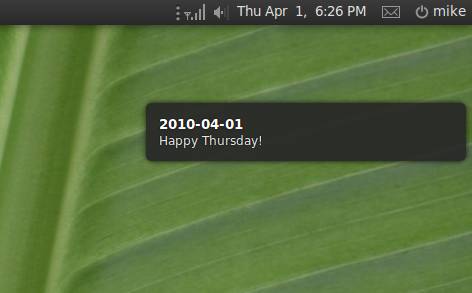
irb(main):021:0>Libnotify.show :summary => “#{Date.today}”, :body => “Happy #{Date::DAYNAMES[Date.today.wday]}!”
=> true

The “require ‘date'” is only there because IRB doesn’t seem to include Date (or doesn’t include all of  it) for some reason. The result:

How awesome is that?

Dealing with a stale cache at the Rails console

Working on other peoples apps can be tough. In spite of all the “convention” that is supposed to come over configuration, people still do a hell of a lot of configuring. In the end it takes a while figure out what’s what in a new app. Different places to create the same effect, dozens of ways to write equivalent code. After scratching my head for a while over a page that had a bunch of links to various models that all resulted in 404’s I was getting a little frustrated. The production log was no help. After dumping the DB and copying it to my dev database I noticed the problem was gone when I ran the app on my local machine. WTF? Then it hit me: Its cached.

So the task was to clean a stale cache from the console. A little searching turned up these gleaming bits of awesomeness and I’m putting them up here so I never forget them. For a starter on caching you should definitely check out the Railsguide.

This will return the cache directory in case you need to “expire” it manually (defaults to the public directory):

ActionController::Base.page_cache_directory

Or clear a page from the cache with something like this:

ApplicationController.expire_page(:controller => “site”, :action => “index”)

or a fragment:

ActionController::Base.new.expire_fragment(:controller => “my”, :action => “index”)
ActionController::Base.new.expire_fragment(/\/productions.*/)
ActionController::Base.new.expire_fragment(‘sidebar’)

I’ll be remembering that one!

Rails 3 finder syntax

Reading about Rails 3 and all the changes that were made is definitely exciting. Big changes to the ActiveRecord API, revamping routing, a tonne of new stuff. At the same time it felt kind of depressing because at first glance it all looked SO different. Even good changes mean that you have to remember the old stuff to work on your old apps and the new stuff for the new apps. Its not as though there isn’t enough learning involved in this occupation already…

Now that I am starting to play with Rails 3 in some of my personal projects, I am happy to report that there is plenty that is exactly the same in Rails 3 and that even the changes are pretty easy to get used to.

So here you go, some things are the same in Rails 3:

Model.find id

Model.find id, id

Model.all

Model.first

Model.last

Model.find_by_…..

Just avoid Model.find :first and Model.find :all. Especially since this syntax will not just deprecated but removed in Rails 3.2. Pratik from the core team has all the details.

The real changes are really just in how you handle giving options and conditions to the find. In fact the new syntax is very jQuery-like, which you are probably using anyway. It becomes natural very quickly.

Things like:

Model.where “id > 1”

or

Model.order(“id desc”).limit 1

There is lots more info over at Rails guides. Not so bad really. Now to figure out what they have done with the Routing!

Rails 3 on Ubuntu Lucid.

I just got finished updating my Rails setup script and testing it on the Alpha 3 version of Lucid. Now that the packages seem to be settling down the the repositories for Lucid suddenly I can find the ones I need for Rails. The script now gets Rails 3 running on either Karmic or Lucid. If you need older versions of Rails just uncomment the lines for the version you need.

You can get  the latest version of the script here: http://github.com/sleepycat/wrong-side-of-the-tracks

Mysql’s explain and indexes in ActiveRecord.

After doing some work on optimising a query in Rails app I am working on I got to thinking about how useful MySQL’s explain statement is. It happens to be really useful for figuring out what, if any, indexes are being used by a given select statement. So I decided to see what I could do about adding that functionality to Rails myself. Projects like this really give you a great tour through a lot of Rails internals, so I figured it would be good for me whether I could figure it out or not. After a little hacking I came up with a patch to ActiveRecord::Base.connection that runs an explain statement before every select. I wrapped it in an unless statement to make sure it does not run if the mode is production.

Explain (0.000000)    | select_type: SIMPLE | key_len: 263 | table: taggings | id: 1 | possible_keys: index_taggings_on_tag_id,index_taggings_on_taggable_id_and_taggable_type | type: ref | Extra: Using where | rows: 1 | ref: const,const | key: index_taggings_on_taggable_id_and_taggable_type
Tag Load (0.000910)   SELECT `tags`.* FROM `tags` INNER JOIN taggings ON tags.id = taggings.tag_id WHERE ((`taggings`.taggable_id = 5) AND (`taggings`.taggable_type = ‘Member’))

The “possible keys” portion is where it lists the indexes for that apply to that query. If there are none there and this is a query that runs a fair bit you probably want to think about adding an index. For me this is a great way to make indexes, or a lack thereof more visible to me during development because they are really easy to forget. So in the spirit of “If you want to truly understand something, try to change it”, here is my first bit of tinkering with ActiveRecord:

unless RAILS_ENV == ‘production’
module ActiveRecord
module ConnectionAdapters
class MysqlAdapter < AbstractAdapter

def select_with_explain(sql, name = nil)

explanation = execute_with_disable_logging(‘EXPLAIN ‘ + sql)

e = explanation.all_hashes.first
exp = e.collect{|k,v| ” | #{k}: #{v} “}.join

log(exp, ‘Explain’)

select_without_explain(sql, name)
end

def execute_with_disable_logging(sql, name = nil) #:nodoc:
#Run a query without logging
@connection.query(sql)
rescue ActiveRecord::StatementInvalid => exception
if exception.message.split(“:”).first =~ /Packets out of order/
raise ActiveRecord::StatementInvalid, “‘Packets out of order’ error was received from the database. Please update your mysql bindings (gem install mysql) and read http://dev.mysql.com/doc/mysql/en/password-hashing.html for more information.  If you’re on Windows, use the Instant Rails installer to get the updated mysql bindings.”
else
raise
end
end

alias_method_chain :select, :explain

end
end
end
end

There it is, quick and dirty. If it ends up being something that I, or other people find really useful I will look at cleaning it up, adding some tests and maybe making a gem out of it. In the mean time you can just paste it into a file in your initializers directory. Happy indexing!

Caveats: I have got this working with Rails 2.1 with MySQL. Its only intended for helping out a little during development, and I have no idea what might happen if you run it elsewhere. If you have some suggested improvements I would love to hear them.
Getting started with Nokogiri on Ubuntu

I am working on a project at the moment that requires that I pick specified elements out of an HTML page. This was the first time that had come up for me and initially I thought I might be able to do this with REXML, but after I tried it in IRB and quickly realised that for parsing potentially dirty HTML this was not the tool for the job. It turns out that Nokogiri is designed for exactly this sort of thing. Getting started with it turned out to be easy as well.

First thing is installing the gem:

mike@sleepycat:~/Desktop$ sudo gem install nokogiri

And then the dependencies:

mike@sleepycat:~$ sudo aptitude install libxml2-dev libxslt-dev

And then the fun of forgetting that I need to require rubygems BEFORE trying to run this in IRB (that part is optional for everyone except me):

mike@sleepycat:~/Desktop$ irb
irb(main):001:0> require ‘nokogiri’
LoadError: no such file to load — nokogiri
from (irb):1:in `require’
from (irb):1
irb(main):002:0> require ‘rubygems’
=> true
irb(main):003:0> require ‘nokogiri’
=> true
irb(main):004:0> require ‘open-uri’
=> true
irb(main):005:0> test = Nokogiri::HTML(open(‘test.html’))

And out comes parsed xml goodness. A little further twiddling I had gotten my XPaths to work had it doing what I needed. I’m pretty impressed how much I could do with Nokogiri in just a few minutes fooling around for the first time. I have a feeling I am going to end up using this a lot.