I work in coffee shops reasonably often, and its surprisingly difficult to find one that has the right combination of comfy chairs, decent coffee and unrestricted WIFI.
Recently one of my favourites had Bell come in and monkey with their router. Of course Bell set up the router to use their nameservers, which, I suspect are some of the slowest in the world (entirely what you would expect if you have had any dealings with Bell).
So when I show up, grab a coffee, and get ready do some work, I notice that everything is really slow.
mike@sleepycat:~☺  time curl www.google.ca > /dev/null
  % Total    % Received % Xferd  Average Speed   Time    Time     Time  Current
                                 Dload  Upload   Total   Spent    Left  Speed
100 10947    0 10947    0     0    698      0 --:--:--  0:00:15 --:--:--  3481
y
real	0m15.675s
user	0m0.013s
sys	0m0.000s
Making the same request using just the IP address so as to skip the DNS name resolution step makes it pretty clear where the problem lies:
e
mike@sleepycat:~☺  time curl 74.125.131.94 > /dev/null
  % Total    % Received % Xferd  Average Speed   Time    Time     Time  Current
                                 Dload  Upload   Total   Spent    Left  Speed
100 10586    0 10586    0     0  47366      0 --:--:-- --:--:-- --:--:-- 47470

real	0m0.234s
user	0m0.009s
sys	0m0.003s
Now this coffee shop is run by some really lovely people, but my attempt to explain DNS resolution and router settings to girl behind the cash while she frothed milk and customers come in behind me went about as well as you might expect.
So back at my table, I got to thinking; “If only there was a way to accept just the IP address from their router but not their nameserver settings…”
Sure enough, Gnome’s NetworkManager has exactly that:
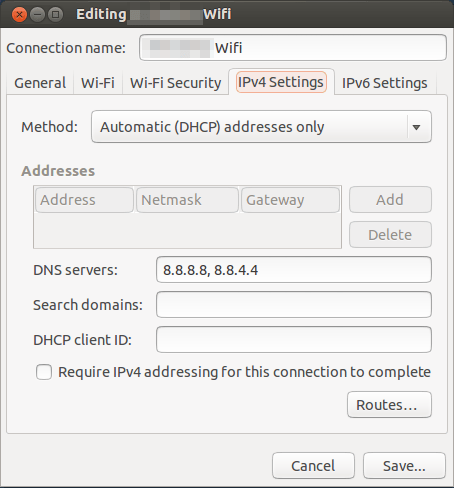
You will notice I am using Google’s public DNS addresses in there. And the result:
mike@sleepycat:~☺  time curl www.google.ca > /dev/null
  % Total    % Received % Xferd  Average Speed   Time    Time     Time  Current
                                 Dload  Upload   Total   Spent    Left  Speed
100 10995    0 10995    0     0  62273      0 --:--:-- --:--:-- --:--:-- 62471

real	0m0.187s
user	0m0.011s
sys	0m0.003s
I love that they thought to add that in there. Well played Gnome! :)