Mastodon

Heroku, Taps and Ubuntu

After beavering away on a Rails app for the last little while I wanted to put it up somewhere so the rest of the world can see it. I signed up with Heroku since they specialise in hosting Rails apps. Their database setup is kind of confusing. It turns out that they totally ignore your database configuration (database.yml is not used.) They just use the schema.rb to create the database that your app needs in their Postgres database. You just run your rake task to set it up. Thats pretty cool, but there is something cooler; can copy your entire local database with data and everything over to their server with the command:

heroku db:push

The only problem for me was that on Ubuntu (jaunty) the command failed telling me that I needed to intall Taps. More aggravating still was the fact that my attempt to install Taps also failed because its dependent on Sqlite3:

mike@jauntyjackalope:~$ sudo gem install taps
[sudo] password for mike:
Building native extensions.  This could take a while…
ERROR:  Error installing taps:
ERROR: Failed to build gem native extension.

/usr/bin/ruby1.8 extconf.rb install taps
checking for fdatasync() in -lrt… yes
checking for sqlite3.h… no
*** extconf.rb failed ***
Could not create Makefile due to some reason, probably lack of
necessary libraries and/or headers.  Check the mkmf.log file for more
details.  You may need configuration options.

Provided configuration options:
–with-opt-dir
–without-opt-dir
–with-opt-include
–without-opt-include=${opt-dir}/include
–with-opt-lib
–without-opt-lib=${opt-dir}/lib
–with-make-prog
–without-make-prog
–srcdir=.
–curdir
–ruby=/usr/bin/ruby1.8
–with-sqlite3-dir
–without-sqlite3-dir
–with-sqlite3-include
–without-sqlite3-include=${sqlite3-dir}/include
–with-sqlite3-lib
–without-sqlite3-lib=${sqlite3-dir}/lib
–with-rtlib
–without-rtlib

Gem files will remain installed in /var/lib/gems/1.8/gems/sqlite3-ruby-1.2.5 for inspection.
Results logged to /var/lib/gems/1.8/gems/sqlite3-ruby-1.2.5/ext/sqlite3_api/gem_make.out

This was pretty annoying. Worse still installing sqlite3 didn’t fix it. It took some googling to figure out what needed to be installed to make Taps and therefore Heroku happy. It turns out that sqlite.h lives in the package libsqlite3-dev:

mike@jauntyjackalope:~$ sudo aptitude install libsqlite3-dev
mike@jauntyjackalope:~$ sudo aptitude install libsqlite3-doc

mike@jauntyjackalope:~$ sudo gem install taps
Building native extensions.  This could take a while…
Successfully installed sqlite3-ruby-1.2.5
Successfully installed taps-0.2.19
2 gems installed

mike@jauntyjackalope:~/dexterchief$ heroku db:push
Auto-detected local database
Sending schema
Sending data
6 tables, 53 records
comments:      100% |==========================================| Time: 00:00:01
posts:         100% |==========================================| Time: 00:00:01
roles:         100% |==========================================| Time: 00:00:00
roles_users:   100% |==========================================| Time: 00:00:00
schema_migrat: 100% |==========================================| Time: 00:00:01
users:         100% |==========================================| Time: 00:00:00
Sending indexes
Resetting sequences

Finally!

Dear Microsoft: No means no.

I switched from Windows XP to Ubuntu in 2007. I used Ubuntu exclusively  for tw0 years with my only real complaints being the inability to play games like Portal or run Photoshop . The purchase of a nice new Canon EOS 40D a few months ago made native Photoshop support a necessity.

When I started shopping for a laptop it quickly became apparent that I was going to be forced to purchase Windows Vista. Dell had some systems with Ubuntu preinstalled but saved their best for Vista. I held my nose and ordered.

Truth be told, after a brief adjustment, I found I kind of liked Vista. Sure it has its foibles but none of them seem so bad when you are upgrading from a seven year old computer (running the latest Ubuntu!) to a shit hot new laptop with enough power to make even Vista seem snappy.

But something had happened in those two years of Ubuntu usage. I had become accustomed to thinking this was MY computer. It was not a sales platform for some Silicon Valley company that wanted to upsell me to a “pro version”. It was not something I was allowed to use as long as I submitted to being served up advertising (like in MSN or Yahoo messenger). There was no corporate agenda being surreptitiously advanced through default settings (like ripping to Windows Media Format or Apples AAC by default just to propagate the format) or bundling programs together (iTunes).

Internet Explorer 8 appeared a several weeks ago as an “Important Update” in my Windows updates.  With IE8 struggling to get beyond a single digit slice of the browser market, it was obvious who the update was important for. Microsoft was chastised for the scummy practise at the time and I decided to deal with it by choosing the “hide this update” option and assumed that would be the end of it.

Checking out the details of a subsequent batch of updates gave me a bit of a start:

ie-update

IE8 again? Didn’t I just say no to this? I guess technically I said “hide this update” but its the closest to “NO” that Microsoft allows. Once again I chose “hide this update” and hoped Microsoft would respect my wishes. After all, this is supposed to be MY computer right?

ie-update2

So here I am again, a new update and once again, IE8 is listed as an “Important” update. This is now my third time telling it to “hide this update”, when will Microsoft learn that NO MEANS NO!

Holding the line

“On average, Office users spend more 1-on-1 time with Office than with their spouse”

This (unfortunately unsourced) gem comes from Jensen Harris’s presentation on the creation of the new “ribbon” based interface in Office 2007. While I think that quote probably says quite a bit about what is wrong with the world, it also tells you that how humans interact with computers is a very big deal. Ones relationship with the tools of their trade in any line of work is going to be necessarily intense and emotional. As software becomes more of a requirement than an option in most lines of work, companies like Microsoft and Apple spend staggering amounts of money studying people interacting with their software.  “Hundreds of millions” were supposedly spent on developing the new interface for Office 2007 according to Harris.

For all the fanfare, the ribbon is just the latest reshuffling of the same windows, icons, menus and folders that were developed at Xerox PARC in the early seventies. The problems in interface design today are largely to do with programs so rich with features that their menus are beginning to look like a rats nest of pop-ups, fly-outs, toolbars, menus, sub-menus and sub-sub-menus (and often sub- sub-sub-menus). Harris says that the research his team has done showed that users felt a loss of control and a loss of a sense of mastery.

I can’t help but wonder if some of these feelings are common to all GUI programs, not just Office. Most people seem to think of the Command Line Interface as the absence of an interface, and are terrified by the monochrome starkness and requirement that at least a few commands are known before the user can start. The first GUI based personal computers (Apple’s Lisa and Macintosh) were a rejection of the CLI and a way to open up computing to a wider audience.

“No command line interface was available on the Macintosh; you talked to it with the mouse, or not at all. This was a statement of sorts, a credential of revolutionary purity. It seemed that the designers of the Mac intended to sweep Command Line Interfaces into the dustbin of history.”    ~~ Neal Stephenson – In the Beginning was the Command Line

The problem was that to make these new GUI’s understandable to users the developers created the now ubiquitous “desktop metaphor”. Users would know what to do in this new virtual world because it would mirror aspects of the physical world. Everything in it would be presented to them as objects on a virtual desktop with folders to organize. However users don’t experience their desktops as a metaphor, for them they are real:

“Back in 1984, explanations of the original Mac interface to users who had never seen a GUI before inevitably included an explanation of icons that went something like this: “This icon represents your file on disk.” But to the surprise of many, users very quickly discarded any semblance of indirection. This icon is my file. My file is this icon. One is not a “representation of” or an “interface to” the other. Such relationships were foreign to most people, and constituted unnecessary mental baggage when there was a much more simple and direct connection to what they knew of reality.” ~~John Siracusa – About the Finder…

Computer use in GUI environments is exploratory, tasks are completed by hunting down menu items and unearthing option dialogs, navigating an environment, like a rat navigating a maze for a piece of cheese, that, for them, might as well be real. The reward at the end of the process might be empowering, but the path to the reward is not.

Command line interfaces offer a very different experience for the user. In many cases users can accomplish the same task but the experience of the path to that end result is very different. The CLI sets up a different kind of relationship with the user, one that also echoes the users real world experience; a master/slave relationship. Because of this, working at the command line is empowering: you issue a command, the computer does it. If I type “aptitude install firefox”, aptitude (The program Ubuntu uses to add and remove programs) installs Firefox. Commands like “su” and “sudo” only reinforce the perception of the machines subservience, allowing you to override even its objections. It’s a very different feeling than fishing through a folder tree trying to find “setup.exe” so you can double click on it and then click “next” a half dozen times.

Words like “power” and “control” tend to come up a fair bit in where the command line is discussed, but although there are plenty of good things to say about GUI’s those are not the first things that spring to mind when describing your feelings about using one. Though there are some that dismiss use of the command line as a major usability roadblock, hopefully as the use of GNU/Linux based systems grows, more people will recognise that it is an efficient and empowering way to get things done. When that happens even normal people will find XKCD funny…

VMware tools and shared folders in Unbuntu 9.04 Jaunty

The latest version of Ubuntu does indeed have some sexy new features, new notifications, eucalyptus cloud support. All around a pretty awesome release. In what I will kindly call a fit of nievete, I decided to upgrade the my VM that I have been using for web development. Although the upgrade from 8.10 to 9.04 went smoothly, the reinstall of VMware tools failed leaving me without any shared folders. So after a little profanity and a lot of googling I thought I would share what got my shared folders back up and running.

First you will want to make sure that you have the headers and other stuff so VMware tools has what it needs to compile everything:

sudo apt-get install linux-headers-`uname -r` build-essential

If you are not running VMware 6.5.2 you will likely be asked where your header files are. 6.5.2 added “experimental” support for Jaunty so it already knows where to look. I was running the server version so my headers were in/lib/modules/2.6.28-11-server/build/include.

If you are running the desktop version you can probably find them here: /lib/modules/2.6.28-11/build/include

What is the location of the directory of C header files that match your running
kernel? [/lib/modules/2.6.28-11-server/build/include]

The first time I tried to install VMware tools, two of the modules failed. I upgraded to version 6.5.2 build 156735 and tried it again and that time only the HGFS module failed with the following error:

CC [M]  /tmp/vmware-config3/vmhgfs-only/page.o
/tmp/vmware-config3/vmhgfs-only/page.c: In function âHgfsDoWriteBeginâ:
/tmp/vmware-config3/vmhgfs-only/page.c:763: warning: ISO C90 forbids mixed declarations and code
/tmp/vmware-config3/vmhgfs-only/page.c: In function âHgfsWriteBeginâ:
/tmp/vmware-config3/vmhgfs-only/page.c:867: error: implicit declaration of function â__grab_cache_pageâ
/tmp/vmware-config3/vmhgfs-only/page.c:867: warning: assignment makes pointer from integer without a cast
make[2]: *** [/tmp/vmware-config3/vmhgfs-only/page.o] Error 1
make[1]: *** [_module_/tmp/vmware-config3/vmhgfs-only] Error 2
make[1]: Leaving directory `/usr/src/linux-headers-2.6.28-11-server’
make: *** [vmhgfs.ko] Error 2
make: Leaving directory `/tmp/vmware-config3/vmhgfs-only’
Unable to build the vmhgfs module.

Fortunately some googling turned up this clever fellow who tells you how to fix the problematic line of code. I did it and am happy to report that it works. Just to make everybody’s lives a little easier I thought I would make the patched code available to save people some time and bother.  You can see the link to it in the code below. So without further ado, here is what you need to do to fix the HGFS. You will need the vmware-tools-distrib folder. I had it laying around from my previous install attempts.

mike@ubuntu:~$ cd vmware-tools-distrib/lib/modules/source/

mike@ubuntu:~/vmware-tools-distrib/lib/modules/source$ rm vmhgfs.tar
rm: remove write-protected regular file `vmhgfs.tar’? y

mike@ubuntu:~/vmware-tools-distrib/lib/modules/source$ wget http://www.dexterchief.com/vmhgfs.tar
–2009-05-03 00:18:25–  http://www.dexterchief.com/vmhgfs.tar
Resolving http://www.dexterchief.com… 67.205.50.232
Connecting to http://www.dexterchief.com|67.205.50.232|:80… connected.
HTTP request sent, awaiting response… 200 OK
Length: 901120 (880K) [application/x-tar]
Saving to: `vmhgfs.tar’

100%[======================================>] 901,120      176K/s   in 5.8s

2009-05-03 00:18:32 (152 KB/s) – `vmhgfs.tar’ saved [901120/901120]

mike@ubuntu:~/vmware-tools-distrib/lib/modules/source$ ls -al vmhgfs.tar
-rw-r–r– 1 mike mike 901120 2009-05-02 23:26 vmhgfs.tar

mike@ubuntu:~/vmware-tools-distrib/lib/modules/source$ chmod 444 vmhgfs.tar

mike@ubuntu:~/vmware-tools-distrib/lib/modules/source$ ls -al vmhgfs.tar
-r–r–r– 1 mike mike 901120 2009-05-02 23:26 vmhgfs.tar

Now that the permissions are set correctly just rerun the install script:

mike@ubuntu:~/vmware-tools-distrib/lib/modules/source$ sudo ./vmware-install.pl

I hope that ends up being useful for somebody.

All I want from Facebook…

The way Facebook looks at its users is that each one is a source of news. A friend request in Facebook-land is really a bi-directional subscription to each others news feeds. This is a cool way to look at the world and the result is a news feed for each of the users that only includes items that users have explicitly opted-into receiving. The other side effect is that the company is now worth 15 Billion dollars.

Sadly the Facebook applications seem to be able to ride roughshod over that opt-in philosophy and send events to users news feeds even when that user does not have the application installed. As a result my news feed now looks like this:

So and so got another likeness match. Are you like me?

This HOTorNOT user wants to meet so and so! What do you think of him? Click here so you can meet HOTTIES too ;)

Somebody scored points for Somebody-else in TV Show Trivia. Somebody just scored 120 points for Somebody-else’s team. Somebody-else’s team now has 17770 points and is a Ace. Play TV Trivia >>

Someone has received a new FunWall post!
Click here to see Someone’s photo!

So and so’s Zombie Mogul regulated on Somebody’s Ancient Vampire! Victory dances ensued. Huzzah!

My news feed is supposed to be the heart of Facebook and totally relevant to me as a user. If I was interested in receiving Vampire/Pirate/Zombie/Werewolf notifications from my friends I would have installed the application. In fact I specifically avoided installing the application because I hate them. Having my feed hijacked by applications I don’t even have installed is pretty bothersome. I know what I will be hoping for, for Christmas…

Facebook Application Sliders

Haunted by Flash 7

For some reason my version of Firefox seems to be haunted by the ghost of Flash 7. I have installed Flash 9 several times now but today when I tried to watch a video on http://www.expertvillage.com I saw nothing but a black square. Thinking it was loading I gave it a few seconds and when nothing had changed a right click confirmed my worst fears as the text “about flash player 7” appeared at the bottom of the menu.

What does it want with me? Is it trying to tell me something?

A little googleing revealed that /home/username/.mozilla/plugins is not the only place that Firefox looks for plugins. It also keeps them in /usr/lib/firefox/plugins/

After terminating the flashplayer.xpt and libflashplayer.so files that were resident in that folder and copying in new ones freshly extracted from the tar.gz file on adobe’s site I can finally watch videos again. I think I finally exorcised the beast.

Flash 7 begone! The power of root compels you!

For the Overweight, Bad Advice by the Spoonful

Although the New York Times has some great articles on health/nutrition, For the Overweight, Bad Advice by the Spoonful really bothers me. I realize that taking a poke at “conventional wisdom” can be good journalism but in this case I don’t feel its very constructive and it rests on some very faulty assumptions. After attacking the usefulness of both diet and exercise, the take away message seems to be “you’re fat, you’re fucked, wait for a pill”.

The argument they make that American’s have probably never eaten well is plausible but does not absolve diet as the culprit as the article implies. For all its talk of new research challenging “conventional wisdom” the author cheerfully trots out an expert who uses the old conventional wisdom that “fat the substance equals fat the condition” to try to make their point:

“The average meal had whole milk and ended with pie…. The typical meal had plenty of fat and calories” and so the argument goes diet might not be the bad guy here after all, so its probably genetic.

I would argue that the sugar spiked, pre-made food we buy today is not equivalent to the food of yesteryear as the article would have us believe. It’s not hard to find evidence of this either:

Full fat milk makes you thinner – Swedish study

“Full fat dairy products are more likely to keep you slim than comparable low fat foods. That’s the apparently topsy-turvy conclusion of a new Swedish study, which shows that the fat encourages calcium uptake.
Researchers at Stockholm’s Karolinska Institute now reckon that daily consumption of full fat dairy products will lead to a reduction of obesity, reported Svenska Dagbladet.”

Findings like that do make me agree with the articles title though; for the overweight, bad advice does indeed come by the spoonful, even from the New York Times.

Ubuntu ♥’s the Nikon Coolpix S6

Nikon’s Coolpix S6 camera sure seems to have a lot going for it; WIFI, HUGE screen, nice colour and image quality and a really nice size. The only real strike against is shutter lag which means that there is a noticeable delay between pushing the button and capturing the image. This can be a real drag for capturing “the moment” in sports related situations. That said, it is still a great camera and I am still actively considering buying one.

The big question I wanted answered before I reach for my wallet is; does it work with Ubuntu?

The answer:

Ubuntu Importing Photos from Coolpix S6

It seems to think the model is an S2 but everything works perfectly. Ubuntu detects it automatically and imports without a hitch.

Ubuntu hearts the Canon A70

One of the things that is often lost in all the well deserved hatred of Microsoft, is that they have spent millions of dollars on studying users and has produced something that, even with all its foibles, is pretty damn easy for most people to use.

As the spoiled beneficiary of all that study and development time I, and every other Windows user, have some pretty high expectations when it comes to having our computers just sort themselves out and do the right thing.

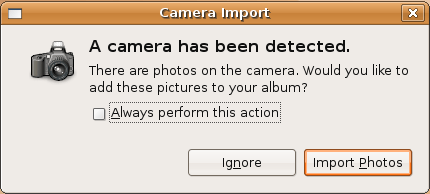
It seems that Mark Shuttleworth and the Ubuntu crew have been paying close attention to the rather expensive lessons that Microsoft has had to learn. I switched to Ubuntu in December and by and large it has lived up to its promise of being easy to use. Case in point; I borrowed a Canon A70 camera so Kathrine and I could take some pictures this weekend. I plugged it in and was greeted with this:

Ubuntu picture import

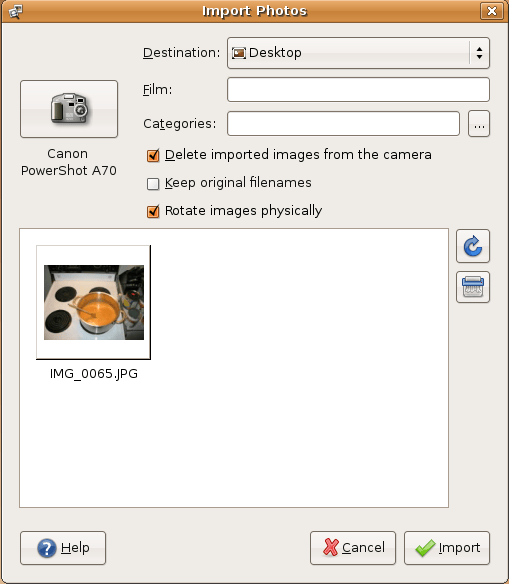
The Import Photos dialogue does exactly what you think it is going to do, and I actually find it faster and  less complicated than the Photo import wizard found in Windows.

Importing pictures from the Canon A70

Ubuntu’s (and Linux in general’s) weak spot is that most companies only create drivers for Windows and leave Linux and Apple users to fend for themselves. This can make it a little dicey when you try connecting exotic things to your Linux system. In this case, it correctly identified the camera, dumped the images onto my desktop and cleaned off the memory card. In other words, everything I was expecting, and nothing I wasn’t. Nice!