Mastodon

Installing memcached gem on Ubuntu Karmic

After my recent fiddling with caching and a little preliminary reading for an interesting side project I’m considering, I decided to install memcached. As will all things on linux, its really easy to install… unless its not. Every time I try to get one of these things going it always takes a while to figure out what packages are needed so the gem can function. So here they are:

sudo aptitude install libmemcached-dev libsasl2-dev libmemcached-dbg

I’m not sure that you need the debug libraries in there but its better to have them and not need them, than need them and not have them. Right?

Now you are ready to install the gem :

sudo gem install memcached –no-rdoc –no-ri

If you miss that libsasl2 library like I did the first time, all manner of badness happens as you can see below. But now you know how to avoid it.

ERROR:  Error installing memcached:
ERROR: Failed to build gem native extension.

/usr/bin/ruby1.8 extconf.rb
Libmemcached already built; run ‘rake clean’ first if you need to rebuild.
creating Makefile

make
gcc -I. -I/usr/lib/ruby/1.8/x86_64-linux -I/usr/lib/ruby/1.8/x86_64-linux -I.  -fPIC  -I/usr/lib/ruby/gems/1.8/gems/memcached-0.19.2/ext/include  -L/usr/lib/ruby/gems/1.8/gems/memcached-0.19.2/ext/lib -fno-strict-aliasing -g -g -O2  -fPIC   -fno-strict-aliasing -g -g -O2  -fPIC   -c rlibmemcached_wrap.c

Just so you know, after completely screwing up my first install, and realising that the suggested “rake clean” in the memcached directory was failing as well, I sorted it out by deleting the entire /usr/lib/ruby/gems/1.8/gems/memcached-0.19.2 directory. Very ugly. Doing it right the first time is recommended.

So now that its installed, lets test it to see that everything is ok using the example from the README:

mike@sleepycat:~$ memcached -p 11211 &
[1] 15778
mike@sleepycat:~$ irb
irb(main):001:0> require ‘rubygems’
=> true
irb(main):002:0> require ‘memcached’
=> true
irb(main):003:0> $cache = Memcached.new(“localhost:11211″)
=> #<Memcached:0x7feb57cf8b50 @not_found=#<Memcached::NotFound: Memcached::NotFound>, @options={:no_block=>false, :logger=>nil, :ketama_weighted=>true, :retry_timeout=>30, :timeout=>0.25, :auto_eject_hosts=>true, :support_cas=>false, :show_backtraces=>false, :rcv_timeout=>0.25, :buffer_requests=>false, :credentials=>nil, :prefix_delimiter=>””, :sort_hosts=>false, :server_failure_limit=>2, :verify_key=>true, :distribution=>:consistent_ketama, :tcp_nodelay=>false, :hash=>:fnv1_32, :default_ttl=>604800, :use_udp=>false, :cache_lookups=>true, :poll_timeout=>0.25, :default_weight=>8, :binary_protocol=>false, :connect_timeout=>4, :hash_with_prefix_key=>true}, @default_ttl=604800, @servers=[“localhost:11211:8”], @not_stored=#<Memcached::NotStored: Memcached::NotStored>, @struct=#<Rlibmemcached::MemcachedSt:0x7feb57cf8ad8>>
irb(main):004:0> value = ‘hello’
=> “hello”
irb(main):005:0> $cache.set ‘test’, value
=> nil
irb(main):006:0> $cache.get ‘test’
=> “hello”
irb(main):007:0>
Rails 3 on Heroku

Heroku sent around an email a little while ago talking about their “experimental” Rails 3 support. After a night of tinkering with a Rails 3 project  I thought I might try it out. When I pushed my project I got this:

Total 131 (delta 27), reused 0 (delta 0)

—–> Heroku receiving push
—–> Gemfile detected, running Bundler
Unresolved dependencies detected; Installing…
Fetching source index from http://gemcutter.org/
Resolving dependencies
Installing abstract (1.0.0) from system gems
Installing actionmailer (3.0.0.beta) from rubygems repository at http://gemcutter.org/
Installing actionpack (3.0.0.beta) from rubygems repository at http://gemcutter.org/
Installing activemodel (3.0.0.beta) from rubygems repository at http://gemcutter.org/
Installing activerecord (3.0.0.beta) from rubygems repository at http://gemcutter.org/
Installing activeresource (3.0.0.beta) from rubygems repository at http://gemcutter.org/
Installing activesupport (3.0.0.beta) from rubygems repository at http://gemcutter.org/
Installing arel (0.2.1) from rubygems repository at http://gemcutter.org/
Installing builder (2.1.2) from system gems
Installing bundler (0.9.12) from rubygems repository at http://gemcutter.org/ /usr/local/lib/ruby/site_ruby/

1.8/rubygems/installer.rb:192:in `install’: bundler requires RubyGems version >= 1.3.6 (Gem::InstallError)
from /usr/local/lib/ruby/gems/1.8/gems/bundler-0.9.9/lib/bundler/source.rb:42:in `install’
from /usr/local/lib/ruby/gems/1.8/gems/bundler-0.9.9/lib/bundler/installer.rb:30:in `run’
from /usr/local/lib/ruby/gems/1.8/gems/bundler-0.9.9/lib/bundler/installer.rb:18:in `each’
from /usr/local/lib/ruby/gems/1.8/gems/bundler-0.9.9/lib/bundler/installer.rb:18:in `run’
from /usr/local/lib/ruby/gems/1.8/gems/bundler-0.9.9/lib/bundler/installer.rb:6:in `install’
from /usr/local/lib/ruby/gems/1.8/gems/bundler-0.9.9/lib/bundler/cli.rb:60:in `install’
from /usr/local/lib/ruby/gems/1.8/gems/bundler-0.9.9/lib/bundler/vendor/thor/task.rb:33:in `send’
from /usr/local/lib/ruby/gems/1.8/gems/bundler-0.9.9/lib/bundler/vendor/thor/task.rb:33:in `run’
from /usr/local/lib/ruby/gems/1.8/gems/bundler-0.9.9/lib/bundler/vendor/thor/invocation.rb:109:in `invoke’
from /usr/local/lib/ruby/gems/1.8/gems/bundler-0.9.9/lib/bundler/vendor/thor/invocation.rb:116:in `call’
from /usr/local/lib/ruby/gems/1.8/gems/bundler-0.9.9/lib/bundler/vendor/thor/invocation.rb:116:in `invoke’
from /usr/local/lib/ruby/gems/1.8/gems/bundler-0.9.9/lib/bundler/vendor/thor.rb:137:in `start’
from /usr/local/lib/ruby/gems/1.8/gems/bundler-0.9.9/lib/bundler/vendor/thor/base.rb:378:in `start’
from /usr/local/lib/ruby/gems/1.8/gems/bundler-0.9.9/lib/bundler/vendor/thor.rb:124:in `start’
from /usr/local/lib/ruby/gems/1.8/gems/bundler-0.9.9/bin/bundle:11
from /usr/local/bin/bundle:19:in `load’
from /usr/local/bin/bundle:19
FAILED: Have you updated to use a 0.9 Gemfile?

Wha? I had filled out my Gemfile, what could it be? It turns out that you need to specify a “stack” to use when you are running Rails 3. The stack is basically all the a specific configuration of all the supporting software (the OS, Ruby, whatever else). Whatever stack I had been given by default (“aspen”) was not the one that contained Rubygems 1.3.6. Check out their stacks page on the Heroku site for more info.

The fix? Even Though I find Heroku’s documentation is usually pretty bad, this time they had exactly what I needed:

mike@sleepycat:~/projects/myapp$ heroku stack:migrate bamboo-ree-1.8.7
—–> Preparing to migrate
aspen-mri-1.8.6 -> bamboo-ree-1.8.7

NOTE: You must specify ALL gems (including Rails) in manifest

Please read the migration guide:
http://docs.heroku.com/bamboo

—–> Migration prepared.
Run ‘git push heroku master’ to execute migration.
Next time I pushed it worked fine. Yay!

Lucid Alpha 3 in Virtualbox.

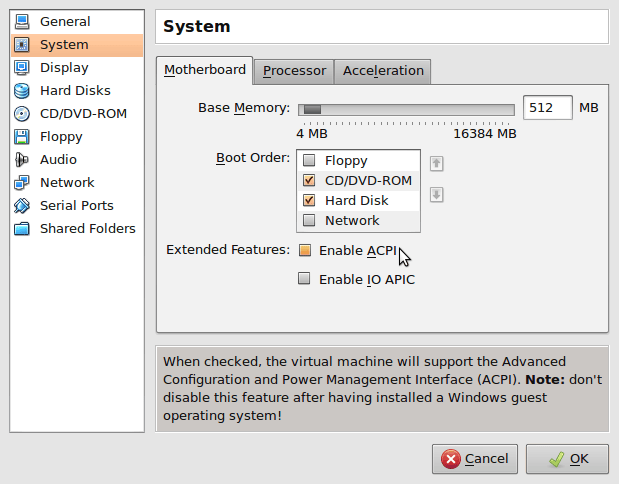
Everything I am hearing about the upcoming Lucid Lynx release of Ubuntu sounds really great. I just grabbed Alpha 3 from the Ubuntu site and was a little dissappointed to see it hang as soon as I selected “Install Ubuntu”. The fix is to turn off the ACPI option in the system settings for your VM.

The side-effect of this is that the virtual machine will no longer close the window and disappear when you shut it down. C’est la vie.

From there the installer started up fine, but it hung again when I tried to update the installer. When I skipped the update it installed without any other problems. Thats what worked for me on Virtualbox 3.08 OSE.

UPDATE: This issue still seems to be effecting the new Lucid Beta 1…

Editing JNLP files – gotcha!

I have been playing with some JavaFX stuff for a little while now and finally gotten to the point where I am trying to deploy my first program. I was a little naive inn thinking this was going to be an easy process and have been forced to have a good hard look at jnlp files. It turns out that most of your apps deployment options are controlled by editing the XML in that file. After a little reading about the different fields I set to tweaking them to see if I could get the effect I was looking for. After making my changes I crossed my fingers and relaunched my app.

No change.

Check my syntax,

No change.

Try some variations.

No change.

No change.

No change.

Try to effect any change whatsoever by editing fields I know are working like <vendor>Mike Williamson</vendor>.

No change.

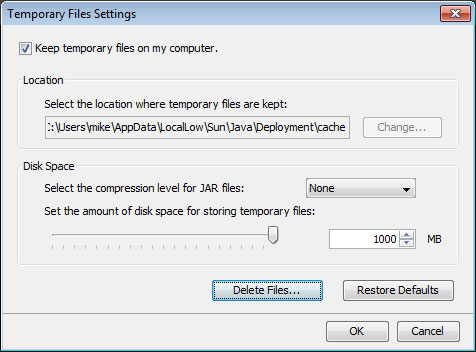
A little poking around reveals that Java is thoughtfully caching the jnlp file and has been totally ignoring all my changes since the first time I loaded the app. Thanks Java. I’ll appreciate that someday.

Under windows go to Control Panel > Programs and open the java control panel. Under Temporary Files settings click “delete files” as shown below and suddenly everything works. Yay!

clearing-java-cache

Connecting to a web server on a VirtualBox guest.

One of the things I did frequently when using VMware is connect from my host (usually Windows) to my guest (usually Linux). The fact that I don’t really remember how I set that up seems to indicate that it was pretty trivial or just worked “out of the box” (which is a funny thing to say about a VM). After happily using Virtualbox for a while now, the need to connect from host to guest has inevitably reared its head and I was a little surprised that there does not seem to be a straight forward way to do that. Turning as one usually does in such a situation, to Google, and since it was a bit of a fiddle I thought I would scrawl it down here.

The Windows version:

Open the Windows command line and navigate to

C:\Program Files\Sun\VirtualBox>

There are three commands that need to be issued. The command is a little daunting at first glance so here are the important parts:

“karmic” is the name I gave my VM when I created it.

“pcnet” refers to the PCNet virtual network card that I am using in my VM which you can select in your network settings. e1000 is also valid if thats what you’re using.

“railsdev” is the name that will be given to the port forwarding configuration that these commands set up.

The rest should be fairly self explanatory:

C:\Program Files\Sun\VirtualBox>VBoxManage.exe setextradata “karmic” “VBoxInternal/Devices/pcnet/0/LUN#0/Config/railsdev/Protocol” TCP

C:\Program Files\Sun\VirtualBox>VBoxManage.exe setextradata “karmic” “VBoxInternal/Devices/pcnet/0/LUN#0/Config/railsdev/GuestPort” 3000

C:\Program Files\Sun\VirtualBox>VBoxManage.exe setextradata “karmic” “VBoxInternal/Devices/pcnet/0/LUN#0/Config/railsdev/HostPort” 3000

On *nix things are roughly the same, except that the default network card is the Intel Pro/1000 instead of the pcnet you can see above. Consequently you will need to do something like this:

vboxmanage setextradata “mavrick_server” “VBoxInternal/Devices/e1000/0/LUN#0/Config/rails/Protocol” TCP
vboxmanage setextradata “mavrick_server” “VBoxInternal/Devices/e1000/0/LUN#0/Config/rails/GuestPort” 80
vboxmanage setextradata “mavrick_server” “VBoxInternal/Devices/e1000/0/LUN#0/Config/rails/HostPort” 8080

You can see that here I am forwarding port 8080 on the host to port 80 on the guest and naming the forwarding configuration “rails”. Also notice the “e1000” that identifies the network card. Other things to note are that the quotes around the VM name (“mavrick_server” in the above example) MUST be there and they must be regular quotes not angled ones like  “ or ”. Angled quotes will be assumed to be part of the machine name and throw an error like this:

ERROR: Could not find a registered machine named ‘“webserver”’

Replace the quotes with proper ones and you should be good.

Happy forwarding!

Heroku, Taps and Ubuntu

After beavering away on a Rails app for the last little while I wanted to put it up somewhere so the rest of the world can see it. I signed up with Heroku since they specialise in hosting Rails apps. Their database setup is kind of confusing. It turns out that they totally ignore your database configuration (database.yml is not used.) They just use the schema.rb to create the database that your app needs in their Postgres database. You just run your rake task to set it up. Thats pretty cool, but there is something cooler; can copy your entire local database with data and everything over to their server with the command:

heroku db:push

The only problem for me was that on Ubuntu (jaunty) the command failed telling me that I needed to intall Taps. More aggravating still was the fact that my attempt to install Taps also failed because its dependent on Sqlite3:

mike@jauntyjackalope:~$ sudo gem install taps
[sudo] password for mike:
Building native extensions.  This could take a while…
ERROR:  Error installing taps:
ERROR: Failed to build gem native extension.

/usr/bin/ruby1.8 extconf.rb install taps
checking for fdatasync() in -lrt… yes
checking for sqlite3.h… no
*** extconf.rb failed ***
Could not create Makefile due to some reason, probably lack of
necessary libraries and/or headers.  Check the mkmf.log file for more
details.  You may need configuration options.

Provided configuration options:
–with-opt-dir
–without-opt-dir
–with-opt-include
–without-opt-include=${opt-dir}/include
–with-opt-lib
–without-opt-lib=${opt-dir}/lib
–with-make-prog
–without-make-prog
–srcdir=.
–curdir
–ruby=/usr/bin/ruby1.8
–with-sqlite3-dir
–without-sqlite3-dir
–with-sqlite3-include
–without-sqlite3-include=${sqlite3-dir}/include
–with-sqlite3-lib
–without-sqlite3-lib=${sqlite3-dir}/lib
–with-rtlib
–without-rtlib

Gem files will remain installed in /var/lib/gems/1.8/gems/sqlite3-ruby-1.2.5 for inspection.
Results logged to /var/lib/gems/1.8/gems/sqlite3-ruby-1.2.5/ext/sqlite3_api/gem_make.out

This was pretty annoying. Worse still installing sqlite3 didn’t fix it. It took some googling to figure out what needed to be installed to make Taps and therefore Heroku happy. It turns out that sqlite.h lives in the package libsqlite3-dev:

mike@jauntyjackalope:~$ sudo aptitude install libsqlite3-dev
mike@jauntyjackalope:~$ sudo aptitude install libsqlite3-doc

mike@jauntyjackalope:~$ sudo gem install taps
Building native extensions.  This could take a while…
Successfully installed sqlite3-ruby-1.2.5
Successfully installed taps-0.2.19
2 gems installed

mike@jauntyjackalope:~/dexterchief$ heroku db:push
Auto-detected local database
Sending schema
Sending data
6 tables, 53 records
comments:      100% |==========================================| Time: 00:00:01
posts:         100% |==========================================| Time: 00:00:01
roles:         100% |==========================================| Time: 00:00:00
roles_users:   100% |==========================================| Time: 00:00:00
schema_migrat: 100% |==========================================| Time: 00:00:01
users:         100% |==========================================| Time: 00:00:00
Sending indexes
Resetting sequences

Finally!

Dear Microsoft: No means no.

I switched from Windows XP to Ubuntu in 2007. I used Ubuntu exclusively  for tw0 years with my only real complaints being the inability to play games like Portal or run Photoshop . The purchase of a nice new Canon EOS 40D a few months ago made native Photoshop support a necessity.

When I started shopping for a laptop it quickly became apparent that I was going to be forced to purchase Windows Vista. Dell had some systems with Ubuntu preinstalled but saved their best for Vista. I held my nose and ordered.

Truth be told, after a brief adjustment, I found I kind of liked Vista. Sure it has its foibles but none of them seem so bad when you are upgrading from a seven year old computer (running the latest Ubuntu!) to a shit hot new laptop with enough power to make even Vista seem snappy.

But something had happened in those two years of Ubuntu usage. I had become accustomed to thinking this was MY computer. It was not a sales platform for some Silicon Valley company that wanted to upsell me to a “pro version”. It was not something I was allowed to use as long as I submitted to being served up advertising (like in MSN or Yahoo messenger). There was no corporate agenda being surreptitiously advanced through default settings (like ripping to Windows Media Format or Apples AAC by default just to propagate the format) or bundling programs together (iTunes).

Internet Explorer 8 appeared a several weeks ago as an “Important Update” in my Windows updates.  With IE8 struggling to get beyond a single digit slice of the browser market, it was obvious who the update was important for. Microsoft was chastised for the scummy practise at the time and I decided to deal with it by choosing the “hide this update” option and assumed that would be the end of it.

Checking out the details of a subsequent batch of updates gave me a bit of a start:

ie-update

IE8 again? Didn’t I just say no to this? I guess technically I said “hide this update” but its the closest to “NO” that Microsoft allows. Once again I chose “hide this update” and hoped Microsoft would respect my wishes. After all, this is supposed to be MY computer right?

ie-update2

So here I am again, a new update and once again, IE8 is listed as an “Important” update. This is now my third time telling it to “hide this update”, when will Microsoft learn that NO MEANS NO!

Holding the line

“On average, Office users spend more 1-on-1 time with Office than with their spouse”

This (unfortunately unsourced) gem comes from Jensen Harris’s presentation on the creation of the new “ribbon” based interface in Office 2007. While I think that quote probably says quite a bit about what is wrong with the world, it also tells you that how humans interact with computers is a very big deal. Ones relationship with the tools of their trade in any line of work is going to be necessarily intense and emotional. As software becomes more of a requirement than an option in most lines of work, companies like Microsoft and Apple spend staggering amounts of money studying people interacting with their software.  “Hundreds of millions” were supposedly spent on developing the new interface for Office 2007 according to Harris.

For all the fanfare, the ribbon is just the latest reshuffling of the same windows, icons, menus and folders that were developed at Xerox PARC in the early seventies. The problems in interface design today are largely to do with programs so rich with features that their menus are beginning to look like a rats nest of pop-ups, fly-outs, toolbars, menus, sub-menus and sub-sub-menus (and often sub- sub-sub-menus). Harris says that the research his team has done showed that users felt a loss of control and a loss of a sense of mastery.

I can’t help but wonder if some of these feelings are common to all GUI programs, not just Office. Most people seem to think of the Command Line Interface as the absence of an interface, and are terrified by the monochrome starkness and requirement that at least a few commands are known before the user can start. The first GUI based personal computers (Apple’s Lisa and Macintosh) were a rejection of the CLI and a way to open up computing to a wider audience.

“No command line interface was available on the Macintosh; you talked to it with the mouse, or not at all. This was a statement of sorts, a credential of revolutionary purity. It seemed that the designers of the Mac intended to sweep Command Line Interfaces into the dustbin of history.”    ~~ Neal Stephenson – In the Beginning was the Command Line

The problem was that to make these new GUI’s understandable to users the developers created the now ubiquitous “desktop metaphor”. Users would know what to do in this new virtual world because it would mirror aspects of the physical world. Everything in it would be presented to them as objects on a virtual desktop with folders to organize. However users don’t experience their desktops as a metaphor, for them they are real:

“Back in 1984, explanations of the original Mac interface to users who had never seen a GUI before inevitably included an explanation of icons that went something like this: “This icon represents your file on disk.” But to the surprise of many, users very quickly discarded any semblance of indirection. This icon is my file. My file is this icon. One is not a “representation of” or an “interface to” the other. Such relationships were foreign to most people, and constituted unnecessary mental baggage when there was a much more simple and direct connection to what they knew of reality.” ~~John Siracusa – About the Finder…

Computer use in GUI environments is exploratory, tasks are completed by hunting down menu items and unearthing option dialogs, navigating an environment, like a rat navigating a maze for a piece of cheese, that, for them, might as well be real. The reward at the end of the process might be empowering, but the path to the reward is not.

Command line interfaces offer a very different experience for the user. In many cases users can accomplish the same task but the experience of the path to that end result is very different. The CLI sets up a different kind of relationship with the user, one that also echoes the users real world experience; a master/slave relationship. Because of this, working at the command line is empowering: you issue a command, the computer does it. If I type “aptitude install firefox”, aptitude (The program Ubuntu uses to add and remove programs) installs Firefox. Commands like “su” and “sudo” only reinforce the perception of the machines subservience, allowing you to override even its objections. It’s a very different feeling than fishing through a folder tree trying to find “setup.exe” so you can double click on it and then click “next” a half dozen times.

Words like “power” and “control” tend to come up a fair bit in where the command line is discussed, but although there are plenty of good things to say about GUI’s those are not the first things that spring to mind when describing your feelings about using one. Though there are some that dismiss use of the command line as a major usability roadblock, hopefully as the use of GNU/Linux based systems grows, more people will recognise that it is an efficient and empowering way to get things done. When that happens even normal people will find XKCD funny…