GitHub has included it’s own OCI image registry for a long time but it’s only recently that I ended up needing it.
While authenticating docker printed out a warning…
WARNING! Your credentials are stored unencrypted in '/home/mike/.docker/config.json'.
Configure a credential helper to remove this warning. See
https://docs.docker.com/go/credential-store/
Things like this bug me, so I wanted to loop back and figure this out.
Getting a token
Using GitHub’s container registry requires an auth token, so we can start our adventure by going to github.com/settings/token and clicking the “Generate New Token” button.
Since GitHub made the somewhat strange decision to associate “packages” with your account (by default) rather than a repo, just choosing a classic (non-repo scoped) token seems like a good fit.
Securing your token
Getting the token solves the authentication problem, but instantly creates a credential management problem.
To solve that problem Docker offers the docker-credential-helper. It has a few flavours, that each delegate management of the credentials to some other service.
Secure against what?
As a developer, my threat model somewhat unavoidably includes running untrusted code, usually in the form of npm postinstall hooks; Shai Halud 2.0 was a recent example of how postinstall scripts are used to harvest credentials.
With this in mind I want my credentials encrypted, and I want to to be prompted when they are getting decrypted.
The pass command line tool does both of those things, so I’ll start by installing that.
Installing pass
On Manjaro or Archlinux you can install pass with pacman:
sudo pacman -S pass
Pass uses gpg but it’s a long time since I messed with that, so I’ll generate a new key with gpg --full-generate-key . Take the email you used to initialize your key (let’s assume it’s me@example.com) and run pass init:
$ pass init me@example.com
mkdir: created directory '/home/mike/.password-store/'
Password store initialized for me@example.com
Now that we have somewhere to store our passwords, let’s get the credential helper installed. On Manjaro or Archlinux you can install that helper from the AUR with Yay:
$ yay -S docker-credential-pass
After that we need to change our docker config to tell docker to delegate credential handling to pass. Then we’ll restart the docker service for good measure.
$ jq '. += {"credsStore": "pass"}' ~/.docker/config.json | sponge ~/.docker/config.json
$ sudo systemctl restart docker.service
Logging into GHCR
If I use pass ls now, I can see there is nothing in my credential store. Lets login to ghcr.io and see if docker stores the password in pass.
$ # use read to define a variable by prompting you for your token
$ read -rs SECRET
$ echo $SECRET | docker login --username myuser ghcr.io --password-stdin
Login Succeeded
$ pass ls
Password Store
└── docker-credential-helpers
    └── Z2hjci5pbw==
        └── myuser
Importantly, cat ~/.password-store/docker-credential-helpers/Z2hjci5pbw\=\=/myuser.gpg shows they are encrypted, so exfiltrating them is useless. And if a malicious script attempts to decrypt them by running echo "ghcr.io" | docker-credential-pass get or directly using pass with pass docker-credential-helpers/Z2hjci5pbw==/myuser I’ll be prompted, so my credentials can’t be silently stolen anymore.
Now I’m ready to docker build -t ghcr.io/username/project/image:latest . and push/pull as normal.
The road not taken: secret service
One other option I explored and eventually rejected was docker-credential-secretservice, which delegates to the linux desktop secret service.
On Manjaro or Archlinux you can install that helper from the AUR with Yay:
$ yay -S docker-credential-secretservice
You’ll need to update your ~/.docker/config.json to specify that you want to use the secret service (docs).
$ jq '. += {"credsStore": "secretservice"}' ~/.docker/config.json | sponge ~/.docker/config.json
Afterwards, simply use docker login and it’ll prompt you for your password, and store it in your operating systems secret store.
$ docker login --username myuser ghcr.io
Password:
Login Succeeded
Whats the problem with that?
I had high hopes for this initially but after some investigation I realized it’s not a good fit for the developer threat model.
Using the secret service means the password is stored with our other credentials in secret service and accessible via the Passwords and Keys app (the GUI frontend for the Gnome Keyring service).
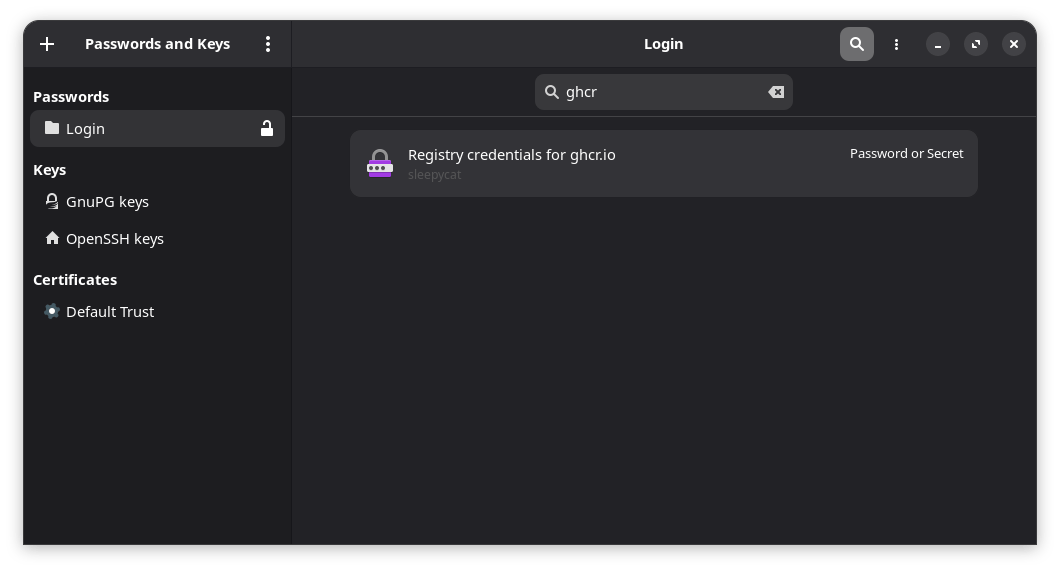
While we’ve avoided leaving unencrypted credentials lying around on disk, we’ve ended up running into the limitations of the Gnome Keyring security model; The user session is the trust boundary, and (all!) programs running within that boundary can access the credentials once the keyring is unlocked.
For a normal desktop user that might be a plausible security assumption, but as a developer, running untrusted code inside that session trust boundary is uncomfortably common.
Since docker-credential-secretservice stores it’s credentials on the default keyring and that keyring is unlocked on login and stays unlocked for the duration of your session, this is pretty underwhelming security-wise.
This means that any malicious npm postinstall script can list my credentials and silently access my token(s) without me ever knowing.
$ docker-credential-secretservice list
{"Registry credentials for ghcr.io":"myuser"}
$ echo "ghcr.io" | docker-credential-secretservice get
{"ServerURL":"ghcr.io","Username":"myuser","Secret":"ghp_abc123YourActualPlaintextTokenHere"}
Safer development practices
Doing development inherently involves running some amount of untrusted code. While pass looks pretty great for mitigating some of the consequences, it’d be nice to address the root problem too.
For those looking to push secure development further putting pass together with something like Deno which doesn’t execute postinstall hooks by default, makes things safer still.