Back in 2012 I switched my caps-lock key to act as a second ESC key. This made a big impact in my Vim usage, and you can understand why when you see the keyboard vi was created with.
Having become reliant on that little tweak, it was a little disconcerting to realize that the keyboard layout options I had used to switch my caps-lock were nowhere to be found in Ubuntu 14.04. It turns out that Gnome (upstream from Ubuntu) removed the settings from the system settings entirely.
Fortunately this is still accessible via the Gnome Tweak Tool.
You can install that like this:
sudo apt-get install gnome-tweak-tool
Once installed you can launch the tool from the terminal:
gnome-tweak-tool
You can find the all the old options under the “typing” option.
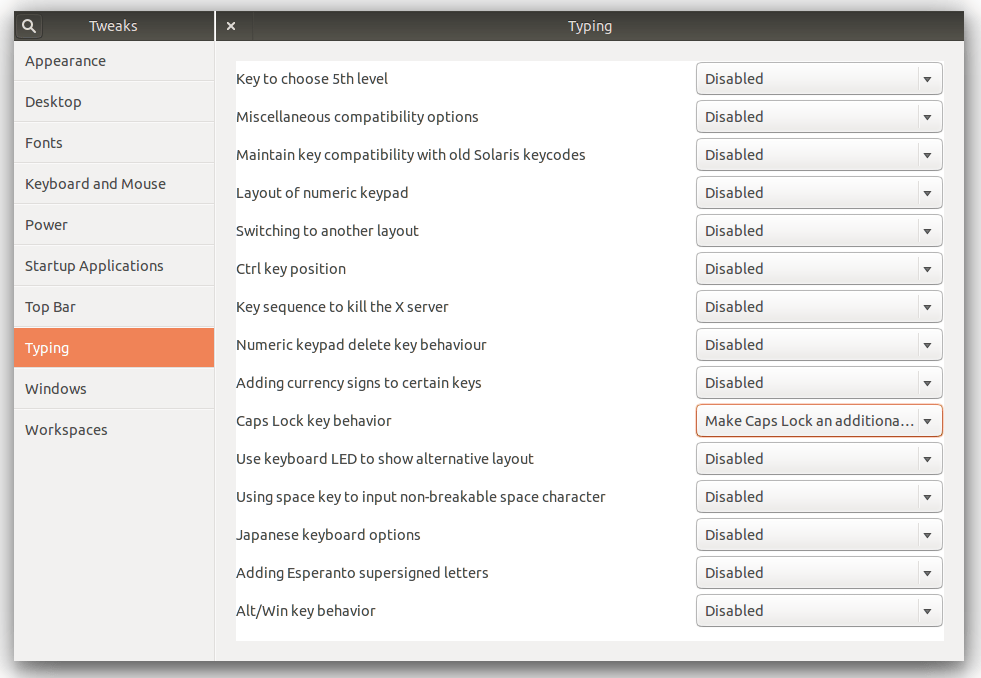
Its a little weird to have such useful stuff suddenly removed from the system settings. Hopefully they will find there way back in a future version, for the moment, my Vim crisis has been averted and that’s enough.