Mastodon

Dear Canonical: Need Data.

Dell’s partnered with Canonical in 2007 was pretty exciting news. In my professional life I have spent close to half a million on computer hardware with the majority of it going to Dell. All my personal computers have always come from them as well. When I decided to get myself a new laptop, I went to straight to Dell.ca/ubuntu to pick out my dream machine.

After a little poking around I realised that they only sell Ubuntu on the low end machines. At the time (almost a year and a half ago now) they sold Ubuntu preinstalled on at least one desktop machine and on maybe three different laptops. Their best one was the lowest end of the XPS line and had very few customisation options.

While I really wanted to buy a system with Ubuntu preinstalled so Dell would know that a market for this stuff actually exists, I also knew I would be doing myself a disservice by buying something less powerful than I needed. After agonising over it I bit the bullet and bought the top of the range XPS with most of the bells and whistles… and Windows Vista.

Looking again, Dell seems to have reduced even that meagre offering and is now only offering Ubuntu preinstalled on the Dell mini netbook and a low-end Inspiron laptop. Aside from the fact that Ubuntu is almost impossible find for anyone not typing in the URL directly, the worst part is the Inspiron 15 with Ubuntu is $579 while the Inspiron 15 with Windows 7 is $569. Perhaps I’m old fashioned, but a computer with a $110 copy of Windows 7 on it should be more expensive than one without. It would be nice if one of the most obvious benefits of Linux were a little more obvious in the pricing. For a partner, Dell seems to have some funny ideas about what will help Ubuntu sell well.

While I believe Dell was correct in sensing that there is a market out there, and gutsy enough to try it out, its Ubuntu offerings seem to be languishing. Partly its pricing silliness and poor marketing but mostly it seems like they are misreading the market. Its been my experience that Linux users don’t buy low end hardware. Low end hardware in the Linux community seems to be something that is either gifted or salvaged, not something you purchase. When purchasing, its mid range to high end systems they are after. With that in mind, I can’t help but feel that Dell has missed the mark with their offering.

I suspect they missed it for the same reason most other companies still think there is no money to be made in the Linux world; there’s very little data. While Canonical is starting to gather a little data for their servers, I think the desktop probably needs it more. Perhaps its time for an Ubuntu version of the Steam Hardware Survey. Maybe they should consider some demographic surveys as well.  I think its time we find out big the GNU dollar is.

I think this needs to happen before companies fall prey to a self fulfilling prophecy; Offer a product blindly, receive an underwhelming response, and conclude that there really is no money to be made from the 12 million+ Ubuntu machines and the unknown number of users of other distros. This kind of data would be invaluable not only to developers considering a Linux version of an existing program, but also to partners like Dell who just seem to need a bit of a nudge in the right direction.

What say you Canonical?

Image overlays with Rmagick and Rails

I knew it wouldn’t be long before I had another foray into Rmagick. This time is pretty similar to last time, except this time I needed to overlay one image on top of another image. There are a few people who have posted about how to do this but I found the information pretty sparse. As I was looking I noticed that some people were using the ImageList class and others the Image class. After ping-ponging between the various tutorials and finding the differences between them pretty confusing, I thought I would sort myself out by using both.

So here is the code that generated that stunning image overlay. I tend to figure this stuff out by sticking it in a controller and tinkering  with it. Once it works I will move it into a model. The code below is taken from my controller. First, the version using the Rmagick’s ImageList class:

def rubylist
ruby = ImageList.new(‘public/images/ruby.jpg’)
rails = ImageList.new(‘public/images/rails.png’)
ruby.gravity=EastGravity
ruby.geometry=’0x0+20+20′
rails_on_ruby = ruby.composite_layers(rails, Magick::OverCompositeOp)
rails_on_ruby.format = ‘jpeg’
send_data rails_on_ruby.to_blob, :stream => ‘false’, :filename => ‘test.jpg’, :type => ‘image/jpeg’, :disposition => ‘inline’
end

So what we have are two ImageList objects; ruby and rails. I am going to use ruby as my “destination” ImageList, meaning it will be the base image that  the other image is applied to. Setting the Gravity and Geometry attributes on the “destination” object means that Rmagick will position the “source” image according to those settings. Calling composite_layers on ruby and feeding it rails and a composite operator let Rmagick know what should be combine with the base image and how it should combine them. Since we already gave it the “where” part of the equation with the gravity and geometry, the rest is easy.

Doing the same thing with the Image class instead of ImageList is just different enough to trip you (read: Me) up:

def ruby
ruby = Image.read(‘public/images/ruby.jpg’)[0] #This returns an Array! Get the first element.
rails = Image.read(‘public/images/rails.png’)[0]
rails_on_ruby = ruby.composite(rails, Magick::EastGravity, 0, 0, Magick::OverCompositeOp) #the 0,0 is the x,y
rails_on_ruby.format = ‘jpeg’
send_data rails_on_ruby.to_blob, :stream => ‘false’, :filename => ‘test.jpg’, :type => ‘image/jpeg’, :disposition => ‘inline’
end

Rmagick pretty consistently works in a way that is the opposite of what I expect. Where I would expect Image.read to return, say, an image, instead it returns an Array. So after some head scratching and a little RTFM time I learned you could do what you see above. Alternately you could do “Image.read(‘public/images/rails.png’).first” if you think it’s prettier. The geometry stuff takes a little fooling around to get sorted out and to see how it works with the gravity. My understanding is that the x,y is just to offset the object from where the gravity setting alone would have placed it.

Like the image annotations before, its not difficult to do, but its a pain to figure out. While there are a bunch of other ways to write this code, this will at least give a running start.

Adding text to pictures with Rmagick and Rails.

Recently I needed to add some dynamically generated text to an image with Ruby on Rails. For some reason there do not seem to be many tutorials on how to work with RMagick so I thought I would share what little I now about it. Originally I looked at Image Science but it turns out that its very focused on simply resizing images. So for this I turned to RMagick. I was a little worried that the installation would be nightmarish but it turned out to be quite painless (at least on Ubuntu. I can’t imagine what it would be like on Windows. Probably bad.):

mike@sleepycat:~$ sudo aptitude install imagemagick librmagick-ruby libmagickwand-dev

Then install the gem:

mike@sleepycat:~$ sudo gem install rmagick

RMagick is a complex library that has tonnes of graphics functions and can transform images in many different ways.
It seems that RMagick works conceptually the same for both Vector graphics and bitmap images: create an image and add text objects to it or create a canvas and add vector objects to it (using Ruby Vector Graphics aka:RVG). So lets do that. So here is an image to start with:

To start playing with RMagick, you can stick this in one of your controllers:

require ‘RMagick’
include Magick

def lolcat

img = ImageList.new(‘public/computer-cat.jpg’)
txt = Draw.new

img.annotate(txt, 0,0,0,0, “In ur Railz, annotatin ur picz.”){
txt.gravity = Magick::SouthGravity
txt.pointsize = 25
txt.stroke = ‘#000000’
txt.fill = ‘#ffffff’
txt.font_weight = Magick::BoldWeight
}

img.format = ‘jpeg’
send_data img.to_blob, :stream => ‘false’, :filename => ‘test.jpg’, :type => ‘image/jpeg’, :disposition => ‘inline’

end

And here is the output of that script:

Although sticking that in a controller is a quick way to see the results of some tinkering and experimentation, this is the kind of stuff that should really be in a model. You would likely want to return img.to_blob from one of your model methods and then use send_data from there.

It’s pretty basic but it was all I needed to get my project working. RMagick does seem to be a little arcane. A lot of the things I tried along the way failed in pretty confusing ways and with pretty cryptic errors. While simple stuff like this is fine its going to take a lot more reading and fiddling to make me truly comfortable with RMagick. At least I have this written down for next time…

Postgres and Rails – for MySQL people

A little while ago I decided to switch from MySQL to Postgres for my development database. Although I love how command line friendly MySQL is and think group_concat is the bomb, I’ve been burned my MySQL’s loosey-goosey nature and had it corrupt some data on me. I decided that it was time to switch to Postgres. The transition was a little aggravating at times but it doesn’t take long to get used to it. Installing Postgres is easy enough on Ubuntu:

mike@sleepycat:~$ sudo aptitude install postgresql postgresql-server-dev-8.4

If you need to start at new Rails project you can specify Postgres right from square one:

mike@sleepycat:~/test$ rails myapp -d postgresql

After installing the database I started to look for the gems that provide the driver. I found myself sorting through a bewildering number of gems. “Postgres”, “postgres-pr”, a few minutes search turned up several options each of which proved to be the wrong thing. The gem you need is actually called ruby-pg and is written by a group of people that includes the actual creator of the Ruby language, Yukihiro Matsumoto. Although it is called ruby-pg if you ever want to find it on the internet, you install it using the name pg:

sudo gem install pg

The next stumbling block for me was my assumption that the naming of the Rails adapter would be similar to MySQL. Since adapter: mysql is what I have been using in my project already, I assumed adapter: postgres would be fine. It’s not.

development:
adapter: postgresql
database: myapp_development
username: postgres
password: password
host: localhost

Coming from MySQL, it took a fair bit of reading to collect the Postgres equivalent of all the commands I use most often. Just to save you some looking here is my “Cole’s Notes” version:

Setting a password for the default user ‘postgres’:

mike@sleepycat:~$ sudo -u postgres psql postgres
[sudo] password for mike:
psql (8.4.2)
Type “help” for help.
postgres=# \password postgres
Enter new password:
Enter it again:

Create a database as user ‘postgres’:

mike@sleepycat:~$ sudo -u postgres createdb myapp_development

Drop a database as user ‘postgres’:

mike@sleepycat:~$ sudo -u postgres dropdb myapp_development

Get to the command line of the database myapp_development as user ‘postgres’:

mike@sleepycat:~$ sudo -u postgres psql myapp_development

Load the file ‘pgdump.sql’ into the myapp_development database as the user ‘postgres’:

mike@sleepycat:~/$ sudo -u postgres psql -f pgdump.sql myapp_development

Dump a Postgres database to a file:

mike@sleepycat:~/$ sudo -u postgres pg_dump myapp_development > ~/myapp_dev_dump.sql

Show tables:

postgres=# \dt

show a table:

postgres=# \d tablename

quit:

postgres=# \q

Thats what worked for me. In general I feel like using postgres is forcing me to write more portable code. Pretty much anything I write in Rails that runs in postgres will run on MySQL, but the reverse is really not true. Little things like using ‘1’ for true. MySQL is fine with that but for Postgres with a real boolean datatype, true is true. 1 is not. I stumbled arcoss that when I was using validates_acceptance_of. I feel like its also forcing me to write better SQL as well. If you’ve written a bunch of “find_by_sql” in an existing app you might not appreciate its pickyness though. However once the initial pain of the switch passes, Postgres is pretty great.

Ubuntu One’s new Music Store

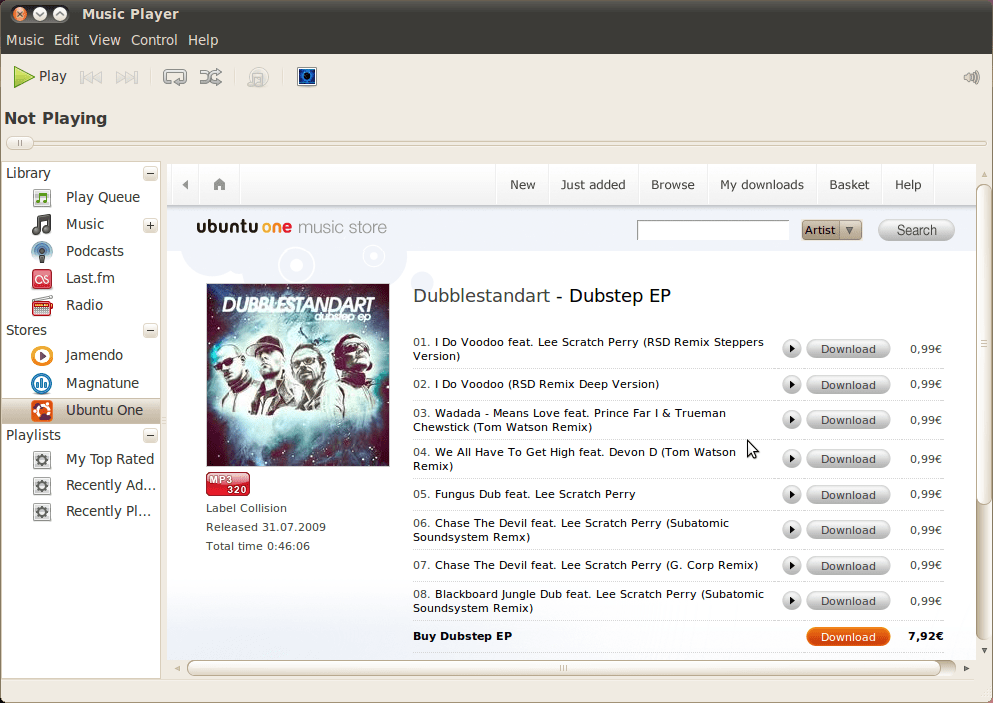
Ubuntu's Music store

Well I’m not sure why it’s here, but it is. Ubuntu launches its music store with the upcoming release of Lucid Lynx. It’s easy enough to find, as its integrated into Rhythmbox. I was lukewarm on the idea when I heard it mentioned a while back, and after playing with it a little, not much has changed. I hate to rain on the parade because Lucid Lynx is looking like a REALLY good release, but this music store feels really tacked on.

While I was able to find pretty near every obscure artist I searched for, searches for Radiohead and Madonna turned up nothing. Where services like Magnatune and Jamendo definitely reflect the values of the Linux community in the sense that both make their ethical business practices (like how they deal with artists) a centre-piece of their business and offer music in open, unpatented formats (lossless Flac and Ogg Vorbis as well as others), the Ubuntu service seems out of step.

Apart from presumably supporting Ubuntu (a worthy thing in and of itself) you can only guess to whom the money might go when you buy a track. All of the albums I looked at were only available in the patented MP3 format, a very strange choice for a company with such powerful a voice in the FOSS community. Doubly strange when Ubuntu doesn’t even play MP3s by default because of the patents involved.

On top of that, while the quality of the files varied between 320 and 192, the price remained steady at .99 euros. Shouldn’t the price and the quality be connected? My guess is that this is really just an Ubuntu front end on someone else’s music service (it turns out it is). If it isn’t, it sure feels that way. In the end I suppose any revenue stream is a good revenue stream, but in my opinion, Ubuntu really needs to rethink this one and bring it in line both with the values of the community and with the othewise excellent work they are doing in other areas.

Ubuntu Lucid Lynx Beta 2

Beta 2 was posted 5 days ago and I am just getting to giving it a spin. The amount of polish on this release is looking seriously impressive. There are still issues with ACPI when you run it in VirtualBox though. I was assuming those would be ironed out by now.

The UI design team at Ubuntu caused a bit of a kerfuffle when they chose to move the min/max/close buttons to the left side of the application windows. Its a change that I find somewhat annoying but one that it has been decided that will be included in the final release. Given that it is so easy to change back, its really not worth getting upset about. If you don’t like it, slap this in the nearest command line:

mike@sleepycat:~$ gconf-editor

The Gnome configuration editor will come up and under /apps/metacity/general/button_layout you can set the buttons up any way you like. The old setting was menu:minimize,maximize,close.

The new installer is looking really impressive:Over all everything is looking rounder, sleeker and sexier. The new purple colour scheme is really nice. I’m not sure yet what I think of the music store that is included in this version or the App store.

While I am happy to see Ubuntu taking this mainstream, I am a little wary of how well some of these commercial ventures will mix with the underlying philsophy. A big part of what makes Linux generally more secure than Windows is the fact that there is no monetary barrier to updating to the lastest version of whatever software. Can you sell applications without losing that? Not sure yet.

For those like myself running VirtualBox OSE 3.0.8; you will need to get a newer version of the Virtualbox Guest additions iso.

Installing memcached gem on Ubuntu Karmic

After my recent fiddling with caching and a little preliminary reading for an interesting side project I’m considering, I decided to install memcached. As will all things on linux, its really easy to install… unless its not. Every time I try to get one of these things going it always takes a while to figure out what packages are needed so the gem can function. So here they are:

sudo aptitude install libmemcached-dev libsasl2-dev libmemcached-dbg

I’m not sure that you need the debug libraries in there but its better to have them and not need them, than need them and not have them. Right?

Now you are ready to install the gem :

sudo gem install memcached –no-rdoc –no-ri

If you miss that libsasl2 library like I did the first time, all manner of badness happens as you can see below. But now you know how to avoid it.

ERROR:  Error installing memcached:
ERROR: Failed to build gem native extension.

/usr/bin/ruby1.8 extconf.rb
Libmemcached already built; run ‘rake clean’ first if you need to rebuild.
creating Makefile

make
gcc -I. -I/usr/lib/ruby/1.8/x86_64-linux -I/usr/lib/ruby/1.8/x86_64-linux -I.  -fPIC  -I/usr/lib/ruby/gems/1.8/gems/memcached-0.19.2/ext/include  -L/usr/lib/ruby/gems/1.8/gems/memcached-0.19.2/ext/lib -fno-strict-aliasing -g -g -O2  -fPIC   -fno-strict-aliasing -g -g -O2  -fPIC   -c rlibmemcached_wrap.c

Just so you know, after completely screwing up my first install, and realising that the suggested “rake clean” in the memcached directory was failing as well, I sorted it out by deleting the entire /usr/lib/ruby/gems/1.8/gems/memcached-0.19.2 directory. Very ugly. Doing it right the first time is recommended.

So now that its installed, lets test it to see that everything is ok using the example from the README:

mike@sleepycat:~$ memcached -p 11211 &
[1] 15778
mike@sleepycat:~$ irb
irb(main):001:0> require ‘rubygems’
=> true
irb(main):002:0> require ‘memcached’
=> true
irb(main):003:0> $cache = Memcached.new(“localhost:11211″)
=> #<Memcached:0x7feb57cf8b50 @not_found=#<Memcached::NotFound: Memcached::NotFound>, @options={:no_block=>false, :logger=>nil, :ketama_weighted=>true, :retry_timeout=>30, :timeout=>0.25, :auto_eject_hosts=>true, :support_cas=>false, :show_backtraces=>false, :rcv_timeout=>0.25, :buffer_requests=>false, :credentials=>nil, :prefix_delimiter=>””, :sort_hosts=>false, :server_failure_limit=>2, :verify_key=>true, :distribution=>:consistent_ketama, :tcp_nodelay=>false, :hash=>:fnv1_32, :default_ttl=>604800, :use_udp=>false, :cache_lookups=>true, :poll_timeout=>0.25, :default_weight=>8, :binary_protocol=>false, :connect_timeout=>4, :hash_with_prefix_key=>true}, @default_ttl=604800, @servers=[“localhost:11211:8”], @not_stored=#<Memcached::NotStored: Memcached::NotStored>, @struct=#<Rlibmemcached::MemcachedSt:0x7feb57cf8ad8>>
irb(main):004:0> value = ‘hello’
=> “hello”
irb(main):005:0> $cache.set ‘test’, value
=> nil
irb(main):006:0> $cache.get ‘test’
=> “hello”
irb(main):007:0>

Fun with Ubuntu’s notifications in Ruby

Ubuntu has a pretty snazzy notification system and, as it turns out, its really easy to use it in your scripts. At its core is libnotify, which is already somewhere on each Ubuntu system. To talk to it in your Ruby scripts you need to install the bindings for Ruby and the gem.

sudo aptitude install libinotify-ruby libgtk2-ruby libnotify-dev;

And then:

sudo gem install libnotify

Once thats done, fire up IRB:

irb(main):018:0> require ‘date’
=> true
irb(main):019:0> require ‘rubygems’
=> true
irb(main):020:0> require ‘libnotify’
=> true
irb(main):021:0>Libnotify.show :summary => “#{Date.today}”, :body => “Happy #{Date::DAYNAMES[Date.today.wday]}!”
=> true

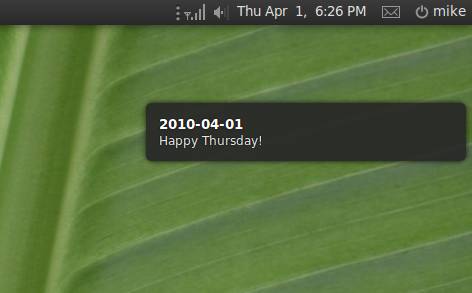
The “require ‘date'” is only there because IRB doesn’t seem to include Date (or doesn’t include all of  it) for some reason. The result:

How awesome is that?

The downward spiral

There are few things that get computer users as riled up as the user interface. Everyone is effected by it and everyone has an opinion about it. What works for one person is likely to induce tourette’s in another. Battle lines have been drawn for years between the Mac world and the PC world and their differing implementations of effectively the same “desktop metaphor”.

Though most of my computer use has been on Windows, I have a few years of solid use of both Mac and Linux. In the last few years I have ended up switching between them at pretty regular intervals: Windows at work, Linux at home and Mac at my Girlfriends. Several months ago, I set up my laptop as a triple boot, (Windows 7, Ubuntu 9.10, and OS X) further accelerating the rate at which I switch between them.

All this jumping from one User Interface to another has slowly created a pretty generic sense of the desktop metaphor in my head along with a notion of trajectory. While there are things I like and things I don’t about each, my overall impression of the trajectory is this: UI is getting worse.

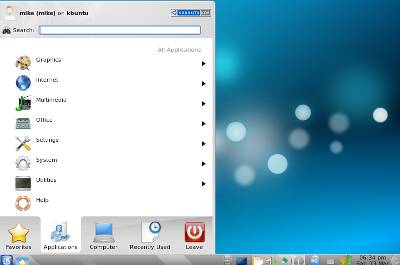
Learning object oriented programming in school we were warned against creating a “God object” that does every possible task in the program. Though that particular anti-pattern is studiously avoided by programmers, it seems increasingly popular for UI designers. So what do the Windows “Start” menu, the KDE “kickoff application launcher”, Windows 7 Start menu and the soon to be released Gnome 3 Activities menu have to do with the God object?

I think they are all part of a UI anti-pattern which I’ll call the “God box”.

To me, its an insane idea that everything that happens on a computer should start by clicking on a single widgit (be it button, menu, launcher or whatever). Many have pointed out how twisted the logic is to have to click a button labelled “Start” to be able to turn off your computer, but this is exactly the kind of stuff you get with a God box. While programs and system settings are proliferating, UI designers are trying to cover up the complexity rather than reduce it.

As Jensen Harris (the guy who designed the Microsoft office ribbon) said of the Word 2002 task pane: “We did what every user interface designer does when they run out of ideas; we invented a new rectangle”. The “Start” menu or the “kickoff application launcher” aren’t new panes but they are essentially a “new rectangle” placed above the mess of submenus in hopes managing the presentation of what lies below.

To me the KDE kickoff application launcher is the most over the top example of this anti-pattern, but it seems that UI nerds everywhere are following it. In Window 7 Microsoft finally ditched the classic start menu and forces everyone to use their version of the God box type Windows menu.

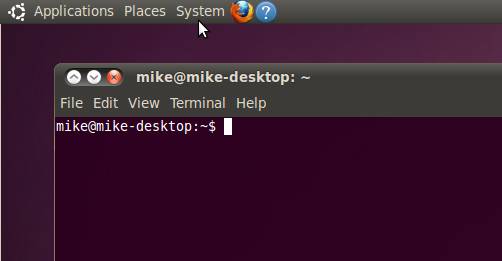
While God boxes allow others stay above the issue, offering ways of filtering the mess below, Gnome waded in and broke the entirety of the operating systems capabilities into enough separate menus that they no longer required filtering or deeply nested sub menus. Currently I have a menu for each of the most common things I am going to do: find a program to run (Applications), look for something (Places) or change something about my computer (System).

With rare exceptions I never need to go below a single sub menu. To me, that’s good UI design. The path to what I want should be as direct as possible. Why should I have to take a trip down the UI rabbithole, hunting for something in a sub sub sub menu when I just want to run one of the applications I have installed? Gnome also kept the best parts of both Windows (like the taskbar) and the Mac (like having a CD/DVD appear on the desktop). In general I think its highly underrated in terms of UI.

Unfortunately, with Gnome 3 around the corner, the UI team at Gnome seem to have succumbed to the same thinking that influenced Microsoft and KDE. It looks like they have created their own God box, known as the “activities menu” to replace all the current menus in Ubuntu 10.10.

Apple seems to avoid most of these issues by saying: “Fuck you, build your own menu” and leaves the users to root through theirs applications folders to set up their equivalent of the applications/programs menu (the dock) themselves. The “apple menu” is really the only other place to look for things that aren’t somewhere in a folder. I suppose simple is a reasonable substitute for friendly, but to me it doesn’t seem like good UI any more that if Microsoft added every program to a quicklaunch bar.

So as far as I can tell the trend seems to be towards more clicking and more sub sub sub menus. Add to that the recent decision by Canonical to purposelessly move the min, max and close buttons to the right (what conceivable benefit could there be that would make the aggravation worth it?), and news about things like the “task pooper”, the path that current UI design is going down is inducing more eye rolling than anticipation in me. I hope I’m wrong about the Gnome activity menu, but I’m not holding my breath.

Rails 3 on Ubuntu Lucid.

I just got finished updating my Rails setup script and testing it on the Alpha 3 version of Lucid. Now that the packages seem to be settling down the the repositories for Lucid suddenly I can find the ones I need for Rails. The script now gets Rails 3 running on either Karmic or Lucid. If you need older versions of Rails just uncomment the lines for the version you need.

You can get  the latest version of the script here: http://github.com/sleepycat/wrong-side-of-the-tracks