Mastodon

Changing keyboard layout options in Ubuntu 14.04

Back in 2012 I switched my caps-lock key to act as a second ESC key. This made a big impact in my Vim usage, and you can understand why when you see the keyboard vi was created with.

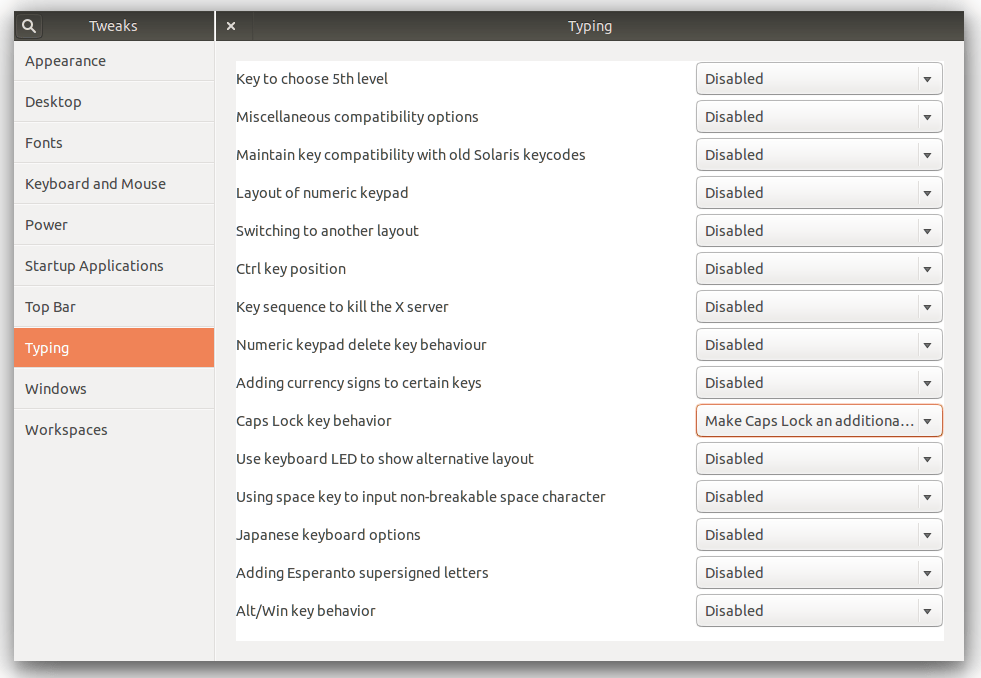
Having become reliant on that little tweak, it was a little disconcerting to realize that the keyboard layout options I had used to switch my caps-lock were nowhere to be found in Ubuntu 14.04. It turns out that Gnome (upstream from Ubuntu) removed the settings from the system settings entirely.

Fortunately this is still accessible via the Gnome Tweak Tool.
You can install that like this:

sudo apt-get install gnome-tweak-tool

Once installed you can launch the tool from the terminal:

gnome-tweak-tool

You can find the all the old options under the “typing” option.
gnome tweak tool

Its a little weird to have such useful stuff suddenly removed from the system settings. Hopefully they will find there way back in a future version, for the moment, my Vim crisis has been averted and that’s enough.

On working with Capybara

I’ve been writing Ruby since 2009 and while TDD as a process has long been clear to me, the morass of testing terminology has not. For a recent project I made pretty significant use of Capybara, and through it, Selenium. While it solved some problems I am not sure I could have solved any other way, it created others and on the way shed some light on some murky terminology.

I think mine was a pretty common pathway to working with Capybara, finding it via Rails and Rspec and the need to do an integration test.

The Rspec equivalent of an integration test is the Request Spec, and its often pointed out that its intended use is API testing, which wasn’t what I was doing. What’s held up as the user focused compliment to request specs are feature specs using Capybara.

The sudden appearance of “the feature” as the focus of these specs, and the brief description of “Acceptance test framework for web applications” at the top of the Capybara Github page should be our first signs that things have shifted a little.

This shift in terminology has implications technically, which are not immediately obvious. The intent of Acceptance testing “is to guarantee that a customers requirements have been met and the system is acceptable“. Importantly, since “Acceptance tests are black box system tests”, this means testing the system from the outside via the UI.

Its this “via the UI” part that should stand out, since its a far cry from the other kinds of tests of tests common with Rails. Uncle Bob has said that testing via the UI “is always a bad idea” and I got a taste of why pretty much right away. Lets take a feature spec like this as an example:

    it "asks for user email" do
      visit '/'
      fill_in "user_email", with: "foo@example.com"
      click_button "user_submit"
      expect(page).to have_content "Thanks for your email!"
    end

Notice that suddenly I am stating expectations about the HTML page contents and looking for and manipulating page elements like forms and buttons.
The code for the user_submit button above would typically look like this in most Rails apps:

<%= f.submit "Submit", :class => "btn snazzy" %>

In Rails 3.0.19 that code would use the User class and the input type to create the id attribute automatically. Our click_button 'user_submit' from above finds the element by id and our test passes:

<input class="btn snazzy" id="user_submit" name="commit" type="submit" value="Submit">

In Rails 3.1.12, the same code outputs this:

<input class="btn snazzy" name="commit" type="submit" value="Submit">

In Rails 3.1 they decided to remove the id attribute from the form submit helper so our click_button "user_submit" from the example test above now finds nothing and the test fails.

Rails view helpers exist to abstract away the details of shifting preferences in HTML, form element naming and the tweakery required for cross-browser support. In spite of that I appear to be violating the boundary that abstraction is supposed to provide by making my tests depend on the specific output of the helper.

There are patterns like page objects that can reduce the brittleness but testing via the UI is something that only makes sense when the system under test really is a black box. If you are the developer of said system, it isn’t and you have better options available.

Contrary to the black box assumption of Acceptance tests, Rails integration tests access system internals like cookies, session and the assigns hash as well as asserting specific templates have been rendered. All of that is done via HTTP requests without reliance on clicking UI elements to move between the controllers under test.

Another problem comes from the use of Selenium. By default Capybara uses rack-test as its driver, but adding js: true switches to the javascript driver which defaults to Selenium:

    it "asks for user email", js: true do
      visit '/'
      fill_in "user_email", with: "foo@example.com"
      click_button "user_submit"
      expect(page).to have_content "Thanks for your email!"
    end

The unexpected consequences of this seemingly innocuous option come a month or two later when I try to run my test suite:

     Failure/Error: visit '/'
     Selenium::WebDriver::Error::WebDriverError:
       unable to obtain stable firefox connection in 60 seconds (127.0.0.1:7055)

What happened? Well, my package manager has updated my Firefox version to 26.0, and the selenium-webdriver version specified in my Gemfile.lock is 2.35.1.

Yes, with “js: true” I have made that test dependent on a particular version of Firefox, which is living outside of my version control and gets auto-updated by my package manager every six weeks.

While workarounds like bundle update selenium-webdriver or simply skipping tests tagged with js:true using rspec -t ~js:true are available, your default rspec command will always run all the tests. The need to use special options to avoid breakage is unlikely to be remembered/known by future selves/developers, so the solution seems to be keeping some sort of strict separation between your regular test suite and, minimally any test that uses js, or ideally all Acceptance tests. I’m not sure that that might look like yet, but I’m thinking about it.

Acceptance testing differs far more that I initially appreciated from other types of testing, and like most things, when used as intended its pretty fabulous. The unsettling thing in all this was how easy it was to drift into Acceptance testing without explicitly meaning to.

Including the Capybara DSL in integration tests certainly blurs the boundaries between two things that are already pretty easily confused.

Capybara’s ostensible raison d’etre seems to be largely glossed over in most other places as well. Matthew Robbins otherwise great book “Application Testing with Capybara“, is not only conspicuously not called “Acceptance testing with Capybara”, it only mentions the words “Acceptance testing” twice. Not exactly a recipe for a clear-eyed look at the tradeoffs of adopting acceptances testing.

Cabybara is certainly nice to work with, and being able to translate a clients “when I click here it breaks” almost verbatim into a test is amazing. I feel like I now have a better idea of how to enjoy that upside without the downside.
Web scraping with Ruby

Writing a web scraper seems to be almost a right of passage as a programmer, and recently I found it was my turn to write one. Judging from the libraries I looked at, the term “web scraping” seems to refer to a spectrum of functionality; web crawling on one end to processing the results on the other, and often doing some combination of the two.

I looked at a few libraries and all of them seemed to either do to much or not enough relative to what I had in mind, so as millions of programmers before me have done, I wrote my own.

The idea was very much oriented around extracting a set of structured information from a given page, and to that end I wrote a little DSL to get it done.
The library is called (very creatively) Skrape.

Assuming you have a page like this at the address example.com:

<html><body><h1>I am a title</h1></body></html>

You can scrape the title off the page with this:

results = Skrape::Page.new("http://example.com").extract do
  extract_title with: 'h1'
end

The results would be:

{title: "I am a title"}

The calls to “extract_*” are caught with method_missing and whatever follows the “extract_” is used as the key in the hash of results that is returned.
To deal with the inevitable edge cases that come up so often in scraping you can all so pass a block which will be handed whatever the CSS selector found so you can do some further processing.

I’ve needed to use it for picking out the href attribute of a link:

results = Skrape::Page.new(url).extract do
  extract_link_href with: 'a', and_run: proc {|link| link.attr('href').value }
end

And also removing problematic <br> tags from elements:

results = Skrape::Page.new(url).extract do
  extract_locations with: '.address', and_run: proc {|address| address.map{|a| a.inner_html.gsub('&lt;br&gt;', ', ')} }
end

While there are still some improvements I would like to make, so far I am pretty happy with the library. It feels readable and does not do to much. If you have some scraping to do, check it out. Pull requests welcome.

An intro to injection attacks

I’ve found myself explaining SQL injection attacks to people a few times lately and thought I would write up something I can just point to instead.

For illustration purposes lets make a toy authentication system.

Lets say you have a database with table for all your users that looks like this:

The structure of table "users":
+-----+-----------+----------------+
| uid | username  | password       |
+-----+-----------+----------------+
|   1 | mike      | catfish        |
+-----+-----------+----------------+
|   2 | sally     | floride        |
+-----+-----------+----------------+
|   3 | akira     | pickles        |
+-----+-----------+----------------+

Lets say a user wants to use your application and you ask them for their username and password, and they give you ‘akira’ and ‘pickles’.

The next step in authenticating this user is to check in the database to see if we have a user with both a username of ‘akira’ and a password of ‘pickles’ which we can do with a SQL statement like this:

select * from user where username = 'akira' and password = 'pickles';

Since we know we have one row that satisfies both of the conditions we set (value in username must equal ‘akira’ and the value in password must equal ‘pickles’), if we hand that string of text to the database and ask it to execute it, we would expect the database to return the following data:

+-----+-----------+----------------+
| uid | username  | password       |
+-----+-----------+----------------+
|   3 | akira     | pickles        |
+-----+-----------+----------------+

If the database returns a row we can let the user go ahead and use our application.

Of course if we need our SQL statement to work for everyone and so we can’t just write ‘akira’ in there. So lets replace the username and password with variables (PHP style):

select * from user where username = '$username' and password = '$password';

Now if someone logs in with ‘mike’ and ‘catfish’ our application is going to place the value ‘mike’ in the variable $username  and ‘catfish’ in the variable $password and the PHP interpreter will be responsible for substituting the variable names for the actual values so it can create the finished string that looks like this:

select * from user where username = 'mike' and password = 'catfish';

This will be passed to the database which executes the command and return a row.

Unfortunately mixing data supplied by the user with our pre-exisisting SQL commands and passing the result to the database as one single string has set the stage for some bad behaviour:

$username = "";
$password = " ' or user_name like '%m% ";

select * from user where username = '$username' and password = '$password';

Once the final string is assembled suddenly the meaning is very different:

select * from user where username = ' ' and password = '' or username like '%m%';

Now our database will return a row if the username AND password are both empty strings OR if any of the usernames contains the letter ‘m’. Suddenly the bar for logging into our application is a lot lower.

There are tonnes of possible variations on this, and it’s a common enough problem that its the stuff of jokes among programmers:

XKCD: Little bobby tables.

The root of the problem is the commingling of user supplied data with commands intended  to be executed. The user supplied password value of “ ‘ or username like ‘%m%” entirely changed the meaning of our SQL command where if we had been able make it clear that this was just a string to search the database for we would have had the expected behaviour of comparing the string ” ‘ or username like ‘%m%” to strings in our list of passwords (‘pickles’, ‘catfish’ and ‘floride’).

If you think about it like that you realize that this is not just a problem with SQL, but a problem that shows up everywhere data and commands are mixed.

Keeping these things separate is the only way to stay safe. When the data is kept separate it can be sanitized, or singled out for whatever special treatment is appropriate for the situation by libraries/drivers or whatever else.

Separating data from commands can look pretty different depending on the what you are working on. Keeping data and commands separate when executing system commands in Ruby or Node.js looks different from keeping them separate using prepared statements to safely query a database using JRuby/Java. The same rules apply to NoSQL things like Mongodb as well.

People far smarter than I am still get caught by this stuff pretty regularly, so there is no magic bullet to solve it. If you are working with Rails, security tools like Breakman can help catch things but the only real solution is awareness and practice.

Usb tethering – that was easy

I’ve had my Google Nexus phone for a while now and am only just starting to explore some of the stuff it can do. A recent pleasant surprise was using tethering so I could connect to the internet from my laptop via my phone. I connected my phone to my laptop with the USB cable and dug into the settings:

Android settings
Android settings screen
Android wireless settings
Tethering and portable hotspot

As you can see you don’t need to dig very far. When I tapped the the “USB tethering” option Ubuntu immediately popped up a notification saying that it had connected to a wired network… and then I checked my email. It happened so fast that I almost feel cheated out of doing something clever to get it going… almost.

If you don’t have your cable you can explore setting up a Wi-Fi hotspot. You’ll just have to add a name and a password for your network.

I have so many memories of installing Windows and having to use a second computer to download drivers for my network card (and every other card)… Ubuntu is making those memories feel very distant indeed.


NetworkManager to the rescue

I work in coffee shops reasonably often, and its surprisingly difficult to find one that has the right combination of comfy chairs, decent coffee and unrestricted WIFI.
Recently one of my favourites had Bell come in and monkey with their router. Of course Bell set up the router to use their nameservers, which, I suspect are some of the slowest in the world (entirely what you would expect if you have had any dealings with Bell).
So when I show up, grab a coffee, and get ready do some work, I notice that everything is really slow.

mike@sleepycat:~☺  time curl www.google.ca &gt; /dev/null
  % Total    % Received % Xferd  Average Speed   Time    Time     Time  Current
                                 Dload  Upload   Total   Spent    Left  Speed
100 10947    0 10947    0     0    698      0 --:--:--  0:00:15 --:--:--  3481
y
real	0m15.675s
user	0m0.013s
sys	0m0.000s

Making the same request using just the IP address so as to skip the DNS name resolution step makes it pretty clear where the problem lies:

e
mike@sleepycat:~☺  time curl 74.125.131.94 &gt; /dev/null
  % Total    % Received % Xferd  Average Speed   Time    Time     Time  Current
                                 Dload  Upload   Total   Spent    Left  Speed
100 10586    0 10586    0     0  47366      0 --:--:-- --:--:-- --:--:-- 47470

real	0m0.234s
user	0m0.009s
sys	0m0.003s

Now this coffee shop is run by some really lovely people, but my attempt to explain DNS resolution and router settings to girl behind the cash while she frothed milk and customers come in behind me went about as well as you might expect.
So back at my table, I got to thinking; “If only there was a way to accept just the IP address from their router but not their nameserver settings…”

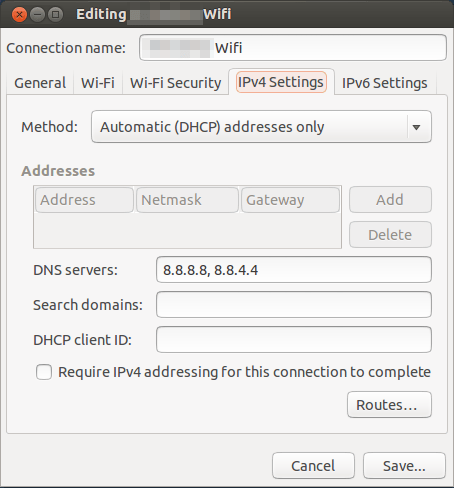
Sure enough, Gnome’s NetworkManager has exactly that:

NetworkManager settings

You will notice I am using Google’s public DNS addresses in there. And the result:

mike@sleepycat:~☺  time curl www.google.ca &gt; /dev/null
  % Total    % Received % Xferd  Average Speed   Time    Time     Time  Current
                                 Dload  Upload   Total   Spent    Left  Speed
100 10995    0 10995    0     0  62273      0 --:--:-- --:--:-- --:--:-- 62471

real	0m0.187s
user	0m0.011s
sys	0m0.003s

I love that they thought to add that in there. Well played Gnome! :)

Zero downtime Rails redeploys with Unicorn

Like any self-respecting Ruby hipster I am using Unicorn as my app server in production. Unlike most Ruby hipsters my deployment process is pretty manual at the moment. While the high-touch manual deployment that I am currently doing is far from ideal long term, short term its giving me a close up look at the care and feeding of a production Rails app. Think of it as wanting to get my hands dirty after years of being coddled by Heroku. :)

Much ado has been made of how unixy Unicorn is, and one of the ways that manifests itself is how Unicorn uses signals to allow you to talk to a running server process. What has been interesting about this has been a reintroduction to the “kill” command. Its pretty common to know that “kill -9 1234” is a quick way to kill process 1234 but it turns out that the kill command has much more happening. The mysterious -9 option is significantly less mysterious once know that kill can send ANY signal, and finally look at the list of options:

mike@sleepycat:~☺  kill -l
 1) SIGHUP	 2) SIGINT	 3) SIGQUIT	 4) SIGILL	 5) SIGTRAP
 6) SIGABRT	 7) SIGBUS	 8) SIGFPE	 9) SIGKILL	10) SIGUSR1
11) SIGSEGV	12) SIGUSR2	13) SIGPIPE	14) SIGALRM	15) SIGTERM
16) SIGSTKFLT	17) SIGCHLD	18) SIGCONT	19) SIGSTOP	20) SIGTSTP
21) SIGTTIN	22) SIGTTOU	23) SIGURG	24) SIGXCPU	25) SIGXFSZ
26) SIGVTALRM	27) SIGPROF	28) SIGWINCH	29) SIGIO	30) SIGPWR
31) SIGSYS	34) SIGRTMIN	35) SIGRTMIN+1	36) SIGRTMIN+2	37) SIGRTMIN+3
38) SIGRTMIN+4	39) SIGRTMIN+5	40) SIGRTMIN+6	41) SIGRTMIN+7	42) SIGRTMIN+8
43) SIGRTMIN+9	44) SIGRTMIN+10	45) SIGRTMIN+11	46) SIGRTMIN+12	47) SIGRTMIN+13
48) SIGRTMIN+14	49) SIGRTMIN+15	50) SIGRTMAX-14	51) SIGRTMAX-13	52) SIGRTMAX-12
53) SIGRTMAX-11	54) SIGRTMAX-10	55) SIGRTMAX-9	56) SIGRTMAX-8	57) SIGRTMAX-7
58) SIGRTMAX-6	59) SIGRTMAX-5	60) SIGRTMAX-4	61) SIGRTMAX-3	62) SIGRTMAX-2
63) SIGRTMAX-1	64) SIGRTMAX	

So with that knowledge lets send some signals to Unicorn to get it serving up the latest version of our code. First we need its process id. We are really just interested in the process id of the master process which we can see is 26465:

mike@sleepycat:/myapp$ ps aux | grep unicorn
503       7995   0:00 grep unicorn
503      26465   0:07 unicorn_rails master -c config/unicorn.rb --env production -D
503      26498   0:11 unicorn_rails worker[0] -c config/unicorn.rb --env production -D
503      26502   2:37 unicorn_rails worker[1] -c config/unicorn.rb --env production -D
503      26506   0:06 unicorn_rails worker[2] -c config/unicorn.rb --env production -D
503      26510   0:06 unicorn_rails worker[3] -c config/unicorn.rb --env production -D
503      26514   0:06 unicorn_rails worker[4] -c config/unicorn.rb --env production -D
503      26518   0:06 unicorn_rails worker[5] -c config/unicorn.rb --env production -D
503      26522   0:06 unicorn_rails worker[6] -c config/unicorn.rb --env production -D
503      26526   0:07 unicorn_rails worker[7] -c config/unicorn.rb --env production -D
503      26530   0:07 unicorn_rails worker[8] -c config/unicorn.rb --env production -D
503      26534   0:06 unicorn_rails worker[9] -c config/unicorn.rb --env production -D
503      26538   0:09 unicorn_rails worker[10] -c config/unicorn.rb --env production -D
503      26542   0:07 unicorn_rails worker[11] -c config/unicorn.rb --env production -D
503      26546   0:07 unicorn_rails worker[12] -c config/unicorn.rb --env production -D
503      26550   0:08 unicorn_rails worker[13] -c config/unicorn.rb --env production -D
503      26554   0:10 unicorn_rails worker[14] -c config/unicorn.rb --env production -D
503      26558   0:08 unicorn_rails worker[15] -c config/unicorn.rb --env production -D
503      26562   0:05 unicorn_rails worker[16] -c config/unicorn.rb --env production -D
503      26566   0:08 unicorn_rails worker[17] -c config/unicorn.rb --env production -D
503      26570   0:07 unicorn_rails worker[18] -c config/unicorn.rb --env production -D
503      26574   0:06 unicorn_rails worker[19] -c config/unicorn.rb --env production -D         

Since I have just pulled down some new code I want to restart the master process. I can get Unicorn to launch an new master process by sending the master process the USR2 signal. After that you can see that there is now a new master (7996) with its set of workers and the old master (26465) and its set of workers

mike@sleepycat:/myapp$ kill -USR2 26465
mike@sleepycat:/myapp$ ps aux | grep unicorn
503       7996  0:07 unicorn_rails master -c config/unicorn.rb --env production -D
503       8035  0:00 unicorn_rails worker[0] -c config/unicorn.rb --env production -D
503       8038  0:00 unicorn_rails worker[1] -c config/unicorn.rb --env production -D
503       8041  0:00 unicorn_rails worker[2] -c config/unicorn.rb --env production -D
503       8044  0:00 unicorn_rails worker[3] -c config/unicorn.rb --env production -D
503       8046  0:00 unicorn_rails worker[4] -c config/unicorn.rb --env production -D
503       8050  0:00 unicorn_rails worker[5] -c config/unicorn.rb --env production -D
503       8052  0:00 unicorn_rails worker[6] -c config/unicorn.rb --env production -D
503       8056  0:00 unicorn_rails worker[7] -c config/unicorn.rb --env production -D
503       8059  0:00 unicorn_rails worker[8] -c config/unicorn.rb --env production -D
503       8062  0:00 unicorn_rails worker[9] -c config/unicorn.rb --env production -D
503       8064  0:00 unicorn_rails worker[10] -c config/unicorn.rb --env production -D
503       8069  0:00 unicorn_rails worker[11] -c config/unicorn.rb --env production -D
503       8073  0:00 unicorn_rails worker[12] -c config/unicorn.rb --env production -D
503       8075  0:00 unicorn_rails worker[13] -c config/unicorn.rb --env production -D
503       8079  0:00 unicorn_rails worker[14] -c config/unicorn.rb --env production -D
503       8082  0:00 unicorn_rails worker[15] -c config/unicorn.rb --env production -D
503       8085  0:00 unicorn_rails worker[16] -c config/unicorn.rb --env production -D
503       8088  0:00 unicorn_rails worker[17] -c config/unicorn.rb --env production -D
503       8091  0:00 unicorn_rails worker[18] -c config/unicorn.rb --env production -D
503       8094  0:00 unicorn_rails worker[19] -c config/unicorn.rb --env production -D
503       8156  0:00 grep unicorn
503      26465  0:07 unicorn_rails master (old) -c config/unicorn.rb --env production -D
503      26498  0:11 unicorn_rails worker[0] -c config/unicorn.rb --env production -D
503      26502  2:37 unicorn_rails worker[1] -c config/unicorn.rb --env production -D
503      26506  0:06 unicorn_rails worker[2] -c config/unicorn.rb --env production -D
503      26510  0:06 unicorn_rails worker[3] -c config/unicorn.rb --env production -D
503      26514  0:06 unicorn_rails worker[4] -c config/unicorn.rb --env production -D
503      26518  0:06 unicorn_rails worker[5] -c config/unicorn.rb --env production -D
503      26522  0:06 unicorn_rails worker[6] -c config/unicorn.rb --env production -D
503      26526  0:07 unicorn_rails worker[7] -c config/unicorn.rb --env production -D
503      26530  0:07 unicorn_rails worker[8] -c config/unicorn.rb --env production -D
503      26534  0:06 unicorn_rails worker[9] -c config/unicorn.rb --env production -D
503      26538  0:09 unicorn_rails worker[10] -c config/unicorn.rb --env production -D
503      26542  0:07 unicorn_rails worker[11] -c config/unicorn.rb --env production -D
503      26546  0:07 unicorn_rails worker[12] -c config/unicorn.rb --env production -D
503      26550  0:08 unicorn_rails worker[13] -c config/unicorn.rb --env production -D
503      26554  0:10 unicorn_rails worker[14] -c config/unicorn.rb --env production -D
503      26558  0:08 unicorn_rails worker[15] -c config/unicorn.rb --env production -D
503      26562  0:06 unicorn_rails worker[16] -c config/unicorn.rb --env production -D
503      26566  0:08 unicorn_rails worker[17] -c config/unicorn.rb --env production -D
503      26570  0:07 unicorn_rails worker[18] -c config/unicorn.rb --env production -D
503      26574  0:06 unicorn_rails worker[19] -c config/unicorn.rb --env production -D

s
Now I want to shutdown the old master process and its workers. I can do that with the QUIT signal:

mike@sleepycat:/myapp$/myapp$ kill -QUIT 26465
mike@sleepycat:/myapp$/myapp$ ps aux | grep unicorn
503       7996  0:07 unicorn_rails master -c config/unicorn.rb --env production -D
503       8035  0:00 unicorn_rails worker[0] -c config/unicorn.rb --env production -D
503       8038  0:00 unicorn_rails worker[1] -c config/unicorn.rb --env production -D
503       8041  0:00 unicorn_rails worker[2] -c config/unicorn.rb --env production -D
503       8044  0:00 unicorn_rails worker[3] -c config/unicorn.rb --env production -D
503       8046  0:00 unicorn_rails worker[4] -c config/unicorn.rb --env production -D
503       8050  0:00 unicorn_rails worker[5] -c config/unicorn.rb --env production -D
503       8052  0:00 unicorn_rails worker[6] -c config/unicorn.rb --env production -D
503       8056  0:00 unicorn_rails worker[7] -c config/unicorn.rb --env production -D
503       8059  0:00 unicorn_rails worker[8] -c config/unicorn.rb --env production -D
503       8062  0:00 unicorn_rails worker[9] -c config/unicorn.rb --env production -D
503       8064  0:00 unicorn_rails worker[10] -c config/unicorn.rb --env production -D
503       8069  0:00 unicorn_rails worker[11] -c config/unicorn.rb --env production -D
503       8073  0:00 unicorn_rails worker[12] -c config/unicorn.rb --env production -D
503       8075  0:00 unicorn_rails worker[13] -c config/unicorn.rb --env production -D
503       8079  0:00 unicorn_rails worker[14] -c config/unicorn.rb --env production -D
503       8082  0:00 unicorn_rails worker[15] -c config/unicorn.rb --env production -D
503       8085  0:00 unicorn_rails worker[16] -c config/unicorn.rb --env production -D
503       8088  0:00 unicorn_rails worker[17] -c config/unicorn.rb --env production -D
503       8091  0:00 unicorn_rails worker[18] -c config/unicorn.rb --env production -D
503       8094  0:00 unicorn_rails worker[19] -c config/unicorn.rb --env production -D
503       8161  0:00 grep unicorn

So now we have a Unicorn serving up the latest version of our code without dropping a single request. Really slick.
Ryan Bates has a screencast that has a broader look at the subject of zero downtime deployments, automated with Capistrano (probably a more sustainable approach), but if you look closely you will see these signals lurking in the code.

If you are interested in digging into more Unix fundamentals (from a Rubyist’s perspective!) I would recommend checking out Jesse Storimer’s books.

Ruby Redos: Rspec

I have always found Rspec syntax fascinating. There is something incredible about being able to type readable English sentences and have them do exactly what you think they will from reading them.
I wanted to take a stab at recreating something like Rspec and it was a great exercise. Test::Unit has always felt foreign and this little experiment was a great reminder of why: It ignores Ruby’s blocks.

Test::Unit works by gathering all the decendents of Test::Unit::TestCase and calling every method that starts with “test_”:

class TestMyClass &lt; Test::Unit::TestCase
  def test_my_method1
    ... 
  end 

  def test_my_method2
    ... 
  end 
end

This approach, to my eyes, is a relative of the command pattern, which is essentially a workaround for the lack of language support for blocks. It does not make much sense to use the command pattern in Ruby but you still see it pop up all over the place.

Rspec syntax, on the other hand, is really a just a bunch of Ruby blocks:

[14] pry(main)&gt; load 'test.rb'
=&gt; true
[15] pry(main)&gt; describe &quot;Thing&quot; do                                                                       
[15] pry(main)*   it &quot;is nil&quot; do                                                                          
[15] pry(main)*     expect(nil).to be_nil                                                                 
[15] pry(main)*   end  
[15] pry(main)* end  
A Thing:
is nil
-----

You will notice that describe is defined on the main object and that everything else I have put in a TestContext class to house the methods that I am expecting to be called in the blocks. Then I am using instance eval to execute the block as though it were part of the TestContext class. One other thing to point out is that calling Proc.new will grab any block that has been passed to the method:

require 'benchmark'

def describe subject
  puts &quot;A #{subject}:&quot;
  block = Proc.new
  Benchmark.measure do
  TestContext.new.run(block)
  end.real
end


class TestContext

  def initialize
    @examples = {}
  end

  def run block
    instance_eval &amp;block
    @examples.each_pair do |desc, code|
      if code.call
        puts &quot;  &#092;&#048;33[32m#{desc}&#092;&#048;33[0m\n&quot;
      else
        puts &quot;  &#092;&#048;33[31m#{desc}&#092;&#048;33[0m\n&quot;
      end
      puts &quot;-----&quot;
    end
  end

  def it its_description
    @examples[its_description] = Proc.new
  end

  def expect thing
    Assertion.new(thing)
  end

  def be_nil
    NilMatcher.new
  end

end

class NilMatcher

  def match subject
    subject.nil?
  end

end

class Assertion

  def initialize subject
    @subject = subject
  end

  def to what
    what.match(@subject)
  end

end

I like the fact that the emphasis is on how a few methods read when chained (describe, it, expect, to, be_nil) and using those as a thin layer around blocks. This is some of the core stuff that that makes Ruby great to work with and, in my opinion, a great example of what Matz is talking about when he says “Languages can be weapons against complexity”.
He has given us blocks in the language so things as common as “wanting to execute code later” is actually part of the language. No design pattern required. The flexibility of the language also means we can write code with a very small distance between what is said and what is meant, further reducing the complexity. Both of those things are on display in Rspec.

Docker networking

I spent some time this week working on building a Docker image using a Dockerfile. In the process I learned a little about networking with Docker that I wanted to record here before I forget about it.

One of the steps in building my image was to update the list of packages using apt-get update. Mysteriously during the build I would get these errors:

sudo docker build -t=&quot;build_2013-10-03&quot; .
Uploading context 20480 bytes
Step 1 : FROM colinsurprenant/ruby-1.9.3-p448
 ---&gt; 6d1e62cb5cff
...
Step 5 : RUN apt-get install --assume-yes software-properties-common sudo libmysqlclient-dev vim
 ---&gt; Running in 481577d7acec
...
Err http://us.archive.ubuntu.com/ubuntu/ raring/main libapt-inst1.5 amd64 0.9.7.7ubuntu4
  Something wicked happened resolving 'us.archive.ubuntu.com:http' (-11 - System error)

Logging in to the container gave me a pointer in the form of a warning and an confirmation of the problem:

sudo docker run -i -t colinsurprenant/ruby-1.9.3-p448 /usr/bin/env bash
WARNING: IPv4 forwarding is disabled.
root@0836328ec06a:/# ping us.archive.ubuntu.com
ping: unknown host us.archive.ubuntu.com

Since Docker containers are run inside a namespace and AuFS is used to hold their files, the only thing shared between the host OS and the container is the kernel. For IP traffic to move between guest and host the kernel must be set to do IP forwarding.

To enable this I needed to use the sysctl command and then restart the Docker daemon:

sudo sysctl -w net.ipv4.ip_forward=1

That little test solved my problem and so the next step was to ensure that the new setting would survive a reboot. As with almost all things on Linux, it just meant editing a configuration file:

sudo vim /etc/sysctl.conf

# Kernel sysctl configuration file for Red Hat Linux
#
# For binary values, 0 is disabled, 1 is enabled.  See sysctl(8) and
# sysctl.conf(5) for more details.

# Controls IP packet forwarding
net.ipv4.ip_forward = 1

My next learning about how networking works with Docker came from wanting the app in my container to access the MySQL database on the host. It turns out that docker creates a network interface:

mike@sleepycat:~☺  ifconfig
docker0   Link encap:Ethernet  HWaddr 9e:b5:ca:76:70:c3  
          inet addr:172.17.42.1  Bcast:0.0.0.0  Mask:255.255.0.0
          inet6 addr: fe80::9cb5:caff:fe76:70c3/64 Scope:Link
          UP BROADCAST RUNNING MULTICAST  MTU:1500  Metric:1
          RX packets:0 errors:0 dropped:0 overruns:0 frame:0
          TX packets:65 errors:0 dropped:0 overruns:0 carrier:0
          collisions:0 txqueuelen:0 
          RX bytes:0 (0.0 B)  TX bytes:10675 (10.6 KB)
...

So on the host side I need to get MySQL to bind to 172.17.42.1, and containers (which will all end up on the 172.x.x.x network) will just connect to that. Don’t forget that your MySQL user ‘x’@’localhost’ won’t be able to connect when its logging in from 172.x.x.x and that you will need to add the “host: 172.17.42.1” to your database.yml.

The only real down side to all this Docker stuff has been that the extra layer of abstraction can make things a little hard on the head. The potential for repeatable, self documenting app deployments using Dockerfiles is pretty exciting. I’m impressed with what I have seen and I know that what I am doing is still pretty primitive. We’ll see what’s next.

Does your predicate return what you think it does?

def has_query?
  self.param_search_query &amp;&amp; self.param_search_query != &quot;Eventname&quot;
end

I found this in some code I was working on today. This is a pretty standard “predicate method”, which, by convention, should always return either true or false. Strangely, as I was exploring the code with Pry, I noticed the method return nil.

It turned out that param_search_query was actually nil, which, when mixed with the logical AND (&&) operator returns something the author clearly did not expect:

mike@sleepycat:~☺  irb
irb(main):001:&gt; nil &amp;&amp; true
=&gt; nil

This was actually surprising to me too. I would have thought that nil would have been falsey and that the expression would return false. Definitely something I am going to remember next time I am using the && operator.

So the next question is, what to do about it.
One way to ensure a boolean return value that I have seen is to use the bang operator twice. This works because !nil is true and !!nil is false:

irb(main):003:0&gt; !!nil
=&gt; false

So we could use that to fix the method like so:

def has_query?
  !!(self.param_search_query &amp;&amp; self.param_search_query != &quot;Eventname&quot;)
end

I’m not a fan of this because I think it obscures the intention of the author.
In the end, since this was in a Rails app I went with the present? method:

def has_query?
  self.param_search_query.present? &amp;&amp; self.param_search_query != &quot;Eventname&quot;
end

The tests pass and I’m back to hunting bigger game…